
Player One Network Patch Notes — My Squads + Mobile Update
🎮 PLAYER ONE NETWORK — PATCH NOTES The Lobby • My Squads • Mobile October 28, 2026 Today brought one of the largest expansions yet to the community side of Player One Network. The…
🎮 PLAYER ONE NETWORK — PATCH NOTES
The Lobby • My Squads • Mobile
October 28, 2026
Today brought one of the largest expansions yet to the community side of Player One Network.
The primary focus has been transforming My Squads from a relatively simple group feature into a much more complete community system — while simultaneously bringing that experience directly into Player One Mobile.
This update introduces major improvements to:
👥 My Squads
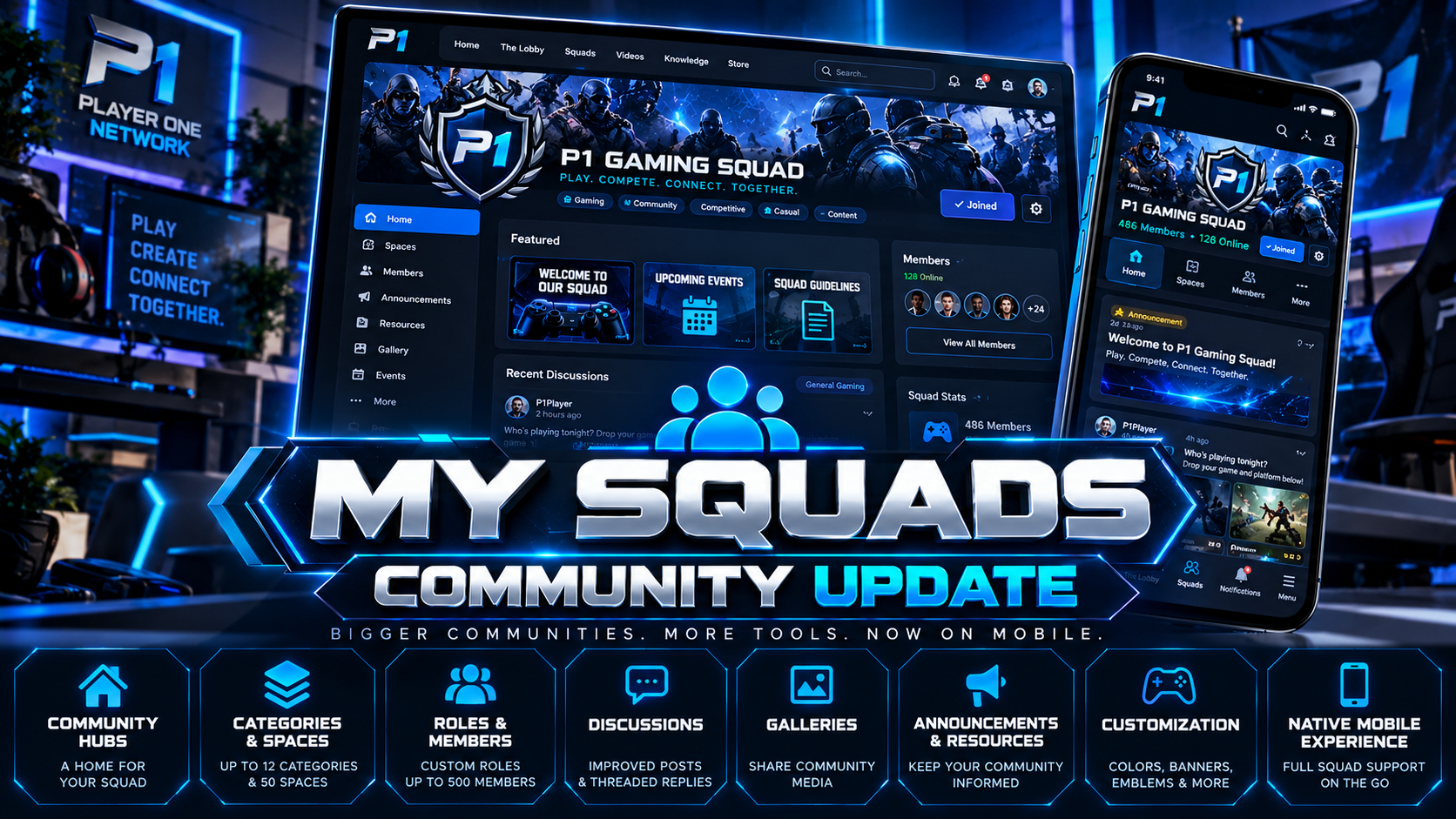
🏠 Squad Community Hubs
🗂️ Categories & Spaces
💬 Posts & Threaded Replies
🎨 Squad Customization
🔐 Roles & Permissions
📢 Announcements & Resources
🖼️ Squad Galleries
📱 Player One Mobile
🛠️ Layout & usability
👥 MY SQUADS — MAJOR COMMUNITY EXPANSION
My Squads has undergone a substantial transformation.
Squads are no longer intended to function as basic player groups.
They can now operate much more like their own communities inside Player One Network.
A Squad can have its own:
- Community home.
- Categories.
- Spaces and channels.
- Sub-channels.
- Discussions.
- Members.
- Roles.
- Announcements.
- Resources.
- Gallery.
- Discord connection.
- Custom appearance.
- Joining rules.
This creates a much stronger foundation for gaming communities, clans, teams, creator communities, friend groups, competitive groups, and other player-run spaces.
🏠 NEW SQUAD COMMUNITY HOME
Each Squad can now have a more complete home experience.
Instead of entering a Squad and immediately seeing a basic information page, the new design provides a central community hub.
The Squad home can surface important information such as:
📢 Announcements
💬 Recent discussions
👥 Community information
🗂️ Available Spaces
🖼️ Gallery activity
📚 Resources
🔗 Connected community links
The goal is to make entering a Squad feel like entering its own community inside P1.
🧭 NEW SQUAD NAVIGATION
Squad navigation has been reorganized around several major sections:
🏠 Home
The main community overview.
🗂️ Spaces
All of the Squad’s discussion areas and channels.
👥 Members
View the people who belong to the Squad.
••• More
Additional community features, settings, resources, and other Squad tools.
This structure makes larger Squads considerably easier to navigate.
🗂️ INTRODUCING COMMUNITY STRUCTURE
One of today’s largest additions is the new Community Structure system.
Squads can now organize conversations into:
Categories
High-level sections that group related areas together.
Spaces
The individual discussion or content areas inside those categories.
Sub-Channels
Additional nested areas beneath Spaces when a Squad needs even more organization.
This allows communities to create structures suited specifically to what they do.
🎮 BUILD A SQUAD AROUND YOUR COMMUNITY
A Squad could now create a structure such as:
🎮 Gaming
↳ General Gaming
↳ Looking for Group
↳ Competitive
🏆 Tournaments
↳ Upcoming Events
↳ Team Signups
↳ Results
💬 Community
↳ General Chat
↳ Introductions
↳ Off Topic
🎬 Content
↳ Videos
↳ Clips
↳ Screenshots
Each Squad can decide how it wants its community organized.
📚 LARGER COMMUNITY STRUCTURES
Squads can support substantially larger layouts.
The expanded system supports up to:
12 Categories
and as many as:
50 Spaces
This gives larger P1 communities room to grow without forcing every conversation into one giant channel.
🧩 DIFFERENT SPACE TYPES
Spaces can now have different purposes rather than every channel behaving exactly the same way.
Typed Spaces create a stronger foundation for areas designed around things such as:
💬 Discussions
📢 Announcements
📚 Information
🎬 Media
🖼️ Gallery-style content
🎮 Gaming discussions
🏆 Events or competitive activity
Each type can have a clearer visual identity and purpose.
🎨 UNIQUE SPACE IDENTITIES
Spaces also received stronger visual differentiation.
Individual areas can use:
- Icons.
- Type-specific presentation.
- Clearer labels.
- Better category separation.
- Improved navigation states.
This makes navigating a larger community considerably easier.
✨ NEW SPACE CREATION EXPERIENCE
The New Space experience was redesigned today.
The previous creation interface was too compressed for the amount of customization now available.
The new direction gives Space creation more room and makes each option easier to understand.
The updated designer improves:
- Spacing.
- Form organization.
- Space-type selection.
- Icon presentation.
- Permission controls.
- Naming.
- Descriptions.
- Visual hierarchy.
Creating a new area should now feel like intentionally designing part of a community instead of filling out a cramped form.
🔐 SPACE PERMISSIONS
Squads can control who is allowed to interact with different Spaces.
Permissions can define who is able to:
👀 Read a Space
and
✍️ Post inside a Space
This gives communities considerably more flexibility.
For example, a Squad could create:
📢 An announcement area everyone can read but only leadership can post in.
🏆 A team area available only to specific roles.
💬 A general discussion area available to all members.
👑 SQUAD ROLES
My Squads now has a much deeper role system.
Community roles include support for positions such as:
👑 Owner
🛡️ Admin
🔧 Moderator
📅 Organizer
👤 Member
Squads can use these roles to create clearer community structure and determine access to specific areas.
🏷️ CUSTOM ROLE NAMES
Squads can also personalize how roles are presented.
Instead of every community needing to use exactly the same terminology, communities can better adapt role names around their own identity.
A competitive team, gaming clan, creator community, or casual friend group doesn’t necessarily need the same naming scheme.
🚪 MORE WAYS TO JOIN A SQUAD
Squads now have more control over membership.
Different joining modes can support communities that are:
🌐 Open
Players can join freely.
✅ Approval Required
Players can request access and wait for approval.
🔒 Private
Membership is more restricted.
This allows communities to decide how open or controlled they want membership to be.
📩 JOIN REQUESTS & INVITES
Membership functionality has also expanded around:
- Join requests.
- Member invitations.
- Request handling.
- Membership status.
- Member management.
This provides a much stronger foundation for organized player communities.
👥 EXPANDED SQUAD CAPACITY
Squads can now support communities of up to:
500 Members
This moves Squads considerably beyond the idea of a small temporary gaming group.
They can now support genuinely larger Player One communities.
💬 SQUAD POSTS REDESIGNED
Posts inside Squad Spaces received another design pass today.
Changes focus on making conversations easier to read and less visually heavy.
Updates include:
- Better post spacing.
- Cleaner action placement.
- Improved author information.
- More consistent containers.
- Better content wrapping.
- Cleaner response areas.
Squad discussions should now feel much closer to the polished experience we’re aiming for across the rest of The Lobby.
🧵 IMPROVED THREADED RESPONSES
Replies inside Squad discussions also received a substantial redesign.
The previous presentation could become too visually heavy when several responses appeared underneath one another.
The new approach uses lighter connected reply cards.
This creates a clearer hierarchy between:
Original Post
↳ Reply
↳ Response
without turning each response into another oversized block.
😀 EMOJI PICKER FIX
The emoji picker inside Squad replies could previously be clipped by surrounding containers.
That issue has been corrected.
The picker now opens in a more appropriate direction with improved layering so members can actually see and select their emoji options.
📐 LONG REPLY WIDTH FIX
Another issue appeared when discussions contained several responses or long text.
Certain replies could force the conversation area wider than intended and begin pushing against the Spaces sidebar.
That has been corrected.
Text and replies now use safer wrapping and width constraints so discussions remain inside their intended content area.
📏 COMMUNITY STRUCTURE LAYOUT IMPROVEMENTS
The Community Structure area itself was also widened and refined.
As more categories, Spaces, controls, and information were added, the previous layout became too cramped.
Today’s improvements include:
- More room for Structure management.
- Better separation between sections.
- Improved category spacing.
- Cleaner Space rows.
- Better control alignment.
- Improved responsive behavior.
🖥️ BETTER DESKTOP SQUAD LAYOUT
The wider My Squad interface received additional refinement around:
- Navigation.
- Spaces.
- Content.
- Community Structure.
- Post areas.
- Sidebars.
The goal is to keep complex communities easy to navigate without making everything feel packed together.
📱 BETTER RESPONSIVE BEHAVIOR
Squads have also received substantial responsive-layout work.
This includes improvements to:
- Smaller desktop windows.
- Tablets.
- Mobile-sized layouts.
- Space navigation.
- Posts and replies.
- Community controls.
The new community structure is designed to adapt rather than simply shrinking an enormous desktop interface.
📢 SQUAD ANNOUNCEMENTS
Squads now have dedicated support for community announcements.
This gives Squad leadership a clear place to share important information without those updates immediately disappearing into everyday discussions.
Announcements can support things such as:
📅 Events
🏆 Tournaments
🎮 Gaming sessions
📢 Community news
🛠️ Changes
👥 Member updates
📚 SQUAD RESOURCES
Communities can also maintain their own resource area.
This gives Squads somewhere to keep important materials rather than repeatedly posting the same information into chat.
Resources can be useful for:
- Community guides.
- Rules.
- Game information.
- Team documents.
- Helpful links.
- Frequently used references.
🖼️ PRIVATE SQUAD GALLERIES
Squads also have their own Gallery functionality.
Members can share visual content within the context of their community rather than every image needing to become a public Lobby post.
This gives Squads a place for things such as:
📸 Screenshots
🎮 Game moments
🏆 Event images
💻 Setup photos
🎨 Community artwork
🔗 DISCORD CONNECTION
Squads can also connect their existing Discord presence.
Rather than forcing every community to abandon services they already use, P1 Squads can complement those communities.
A Squad can use Player One for discovery, identity, discussions, resources, galleries, and progression while still linking members to its Discord community.
🎨 MUCH MORE SQUAD CUSTOMIZATION
Squads received substantially deeper customization today.
Communities can personalize elements such as:
🎨 Custom colors
🛡️ Emblems
🖼️ Banners
✏️ Taglines
🌈 Themes
🏷️ Role names
The goal is for individual Squads to develop their own recognizable identity while still remaining clearly part of Player One Network.
🏆 SQUAD ACHIEVEMENTS
Squad activity is also becoming more connected with Player One progression.
The foundation now supports community-related achievements as another way of recognizing participation across P1.
This continues the broader goal of having activity throughout Player One Network contribute toward a member’s identity and progression.
📱 PLAYER ONE MOBILE — MY SQUADS GO NATIVE
Today’s second major story is Player One Mobile.
My Squads is no longer limited to a lightweight or secondary mobile experience.
The system has now been brought much more deeply into the app.
📱 Mobile 1.4 → 1.5
The latest mobile builds introduce a substantially more complete native Squad experience.
🏠 NATIVE SQUAD COMMUNITY HOME
Opening a Squad through Player One Mobile now provides its own community experience.
Mobile supports the same major structure:
🏠 Home
🗂️ Spaces
👥 Members
••• More
rather than simply sending members into a simplified Squad listing.
🗂️ CATEGORIES & SPACES ON MOBILE
The mobile experience can work directly with a Squad’s categories and Spaces.
That includes support for:
- Categories.
- Channels.
- Spaces.
- Sub-channels.
- Typed Spaces.
- Different permissions.
This brings substantially more parity between desktop and mobile.
💬 NATIVE SQUAD DISCUSSIONS
Players can participate in Squad discussions directly from the app.
Mobile support includes:
- Reading posts.
- Creating posts.
- Threaded replies.
- Editing your own content.
- Deleting your own content.
- Navigating between Spaces.
This means Squad participation no longer requires moving back to the desktop experience for normal conversations.
🔎 SPACE SEARCH
Larger communities can become difficult to navigate when they contain many different areas.
Mobile Squad navigation therefore includes support for searching through Spaces.
This should make finding a particular conversation much faster inside larger communities.
🔵 UNREAD INDICATORS
Space navigation can also communicate which areas have activity waiting for you.
Unread indicators help members quickly identify where new conversation has happened instead of manually opening every channel.
👥 MOBILE MEMBERS AREA
Squad member information is also available inside the native mobile experience.
Members can browse the people within their community without leaving the app.
This strengthens the social side of Squads instead of treating them only as collections of discussion channels.
🚪 MOBILE MEMBERSHIP FEATURES
The mobile experience also supports the broader Squad membership system.
That includes functionality around:
- Joining communities.
- Join requests.
- Invitations.
- Membership status.
- Leaving Squads.
Players can manage their communities wherever they’re using P1.
📢 ANNOUNCEMENTS ON MOBILE
Squad announcements are available through the mobile experience as well.
Important community updates therefore remain visible regardless of whether someone is browsing from a computer or their phone.
📚 RESOURCES ON MOBILE
Squad Resources can also be accessed directly from Mobile.
This helps keep useful community information available when members are away from their desktop.
🖼️ SQUAD GALLERY ON MOBILE
Squad Gallery functionality has also been brought into the native experience.
Members can access and upload community media directly through Player One Mobile.
This builds on the broader Gallery work already introduced across P1.
🔗 DISCORD ACCESS ON MOBILE
Connected Squad Discord information remains accessible through the mobile community experience.
This provides a straightforward bridge between the Squad’s P1 presence and any Discord community it maintains.
🎨 MOBILE SQUAD IDENTITY
The native experience also respects more of a Squad’s individual identity.
Squad details and appearance are carried into the mobile experience rather than every community becoming one generic template.
That includes support around community:
- Details.
- Visual presentation.
- Branding.
- Structure.
🛠️ CREATE & MANAGE COMMUNITY STRUCTURE FROM MOBILE
One of the biggest steps in Mobile 1.5 is that Squad structure itself can be worked with directly from the app.
Native support includes managing:
- Categories.
- Spaces.
- Sub-channels.
- Space types.
- Permissions.
This makes Player One Mobile significantly more capable for people who run their communities primarily from a phone or tablet.
🔄 CLOSER DESKTOP + MOBILE PARITY
Today’s updates represent a major shift in how we approach Player One Mobile.
Instead of building completely separate simplified versions of systems, the goal is increasingly:
Build once as a Player One feature.
Make it work everywhere.
A Squad should still be your Squad whether you’re visiting it through desktop or Mobile.
Its:
🗂️ Structure
💬 Conversations
👥 Members
🎨 Identity
📢 Announcements
📚 Resources
🖼️ Gallery
should follow you.
📋 THE LOBBY / MY SQUADS UPDATE HIGHLIGHTS
Today’s major Squad additions and changes include:
👥 My Squads transformed into full communities
🏠 New Squad Community Home
🧭 Home • Spaces • Members • More navigation
🗂️ Categories introduced
💬 Spaces and channels introduced
↳ Sub-channels supported
🧩 Multiple Space types
🔐 Read and posting permissions
👑 Expanded community roles
🏷️ Custom role names
🚪 Open, Approval, and Private communities
📩 Join requests and invitations
👥 Up to 500 members
📢 Squad Announcements
📚 Squad Resources
🖼️ Private Squad Gallery
🔗 Discord connection
🎨 Custom colors, emblem, banner, tagline, and themes
🏆 Squad achievement foundation
🗂️ Up to 12 Categories
💬 Up to 50 Spaces
✨ Redesigned New Space experience
🧵 Cleaner threaded replies
😀 Emoji picker clipping fixed
📐 Long replies no longer distort the sidebar
🖥️ Wider Community Structure interface
📱 Improved responsive layouts
📋 PLAYER ONE MOBILE UPDATE HIGHLIGHTS
📱 My Squads rebuilt as a native mobile experience
🏠 Native Squad Home
🗂️ Categories and Spaces
↳ Sub-channel support
🧩 Typed Spaces
🔐 Space permissions
💬 Native posts
🧵 Threaded replies
✏️ Edit your own content
🗑️ Delete your own content
🔎 Space search
🔵 Unread indicators
👥 Member browsing
🚪 Joining and leaving communities
📩 Requests and invitations
📢 Announcements
📚 Resources
🖼️ Squad Gallery access and uploads
🔗 Discord integration
🎨 Squad appearance and details
🛠️ Community Structure management
📐 Much closer desktop/mobile feature parity
🌐 FROM SQUADS TO COMMUNITIES
Today’s update fundamentally changes what a Squad can be.
A Squad can still be five friends looking for people to play with tonight.
But it can also grow into:
🏆 A competitive team.
🎮 A gaming clan.
🎬 A creator community.
💻 A technology group.
🤝 A social community.
🌎 A large Player One organization.
And now those communities can follow you onto Mobile too.
💙 BUILD YOUR SPACE ON PLAYER ONE
Player One Network is increasingly becoming more than somewhere communities simply post content.
We’re building tools that allow those communities to actually establish a home here.
Create your identity.
Organize your Spaces.
Start conversations.
Share resources.
Build your Squad.
Find your people.
👥 WELCOME TO THE NEXT GENERATION OF MY SQUADS.
Play. Create. Connect. Belong. 💙
— Player One Network
COMMUNITY DISCUSSION
Join the conversation