
Patch Notes #7
🎮 PLAYER ONE NETWORK — PATCH NOTES Video • Mobile • The Lobby September 30 – October 1, 2026 Another major development session is complete across Player One Network. This update focused on strengthening…
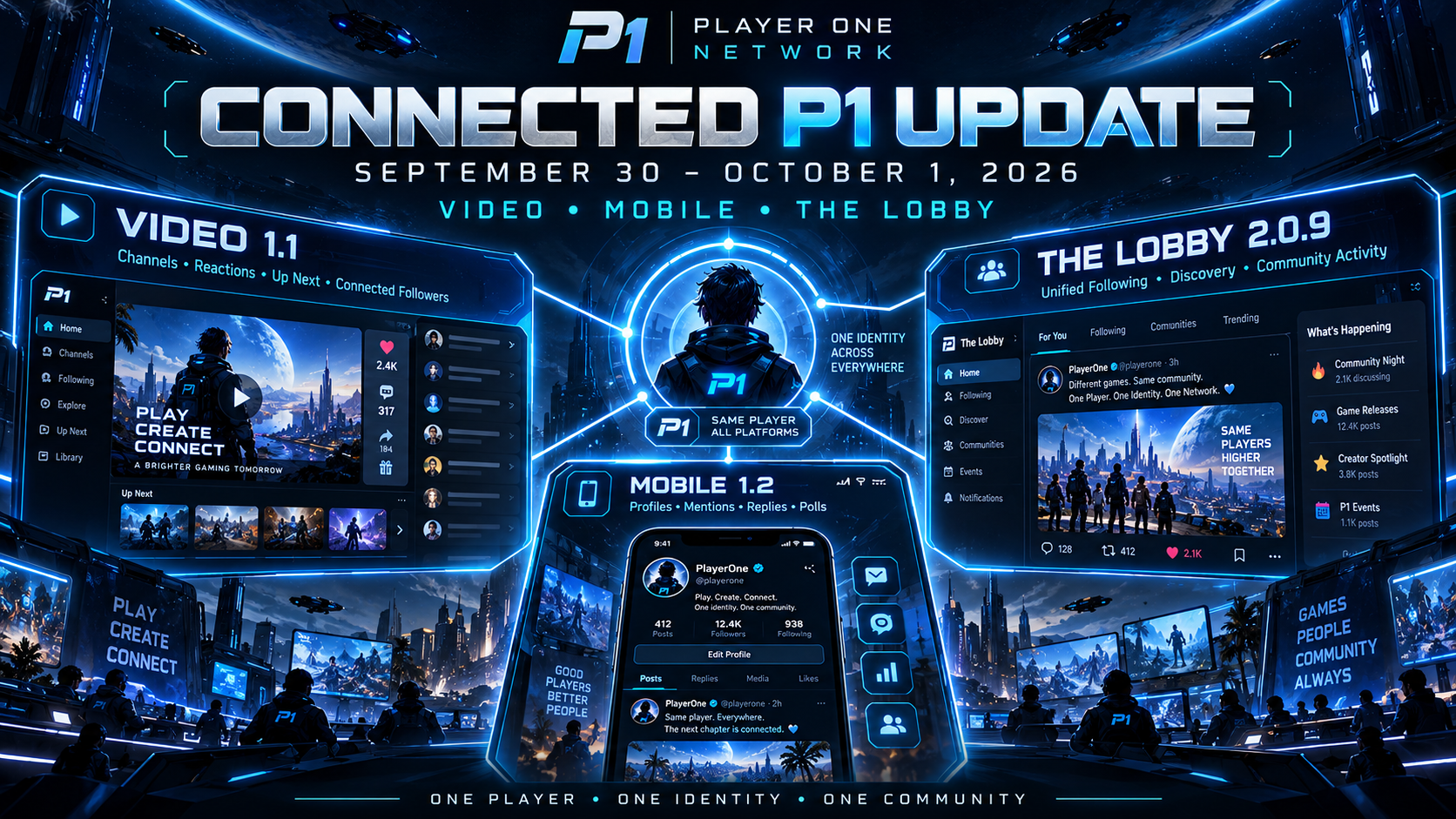
🎮 PLAYER ONE NETWORK — PATCH NOTES
Video • Mobile • The Lobby
September 30 – October 1, 2026
Another major development session is complete across Player One Network.
This update focused on strengthening the connection between three major parts of P1:
🎬 Player One Video
📱 Player One Mobile
💬 The Lobby
Today’s work brings major creator improvements, better mobile social features, redesigned video interactions, important layout fixes, and — most importantly — a much stronger connection between your identity across Video and The Lobby.
🎬 PLAYER ONE VIDEO — CREATOR HUB 1.1
Player One Video received another substantial update following the introduction of Video 1.0.
The latest Creator Hub releases focus on:
- Better creator discovery.
- Improved channel access.
- Mobile-friendly video interactions.
- Cleaner recommendation layouts.
- Stronger Lobby integration.
- Unified follower counts.
📺 NEW DEDICATED CHANNELS PAGE
Creator discovery has been expanded with a dedicated Channels area.
Instead of channel discovery being buried inside another part of the Video experience, creators now have their own destination within Player One Video.
The Channels page makes it easier to:
👤 Discover creators
🎬 Visit creator channels
🔎 Find new people to follow
🌐 Explore the wider P1 creator community
This helps separate discovering creators from simply browsing individual videos.
👤 CREATORS NO LONGER NEED A VIDEO TO BE DISCOVERED
Previously, a creator could effectively remain invisible in channel discovery until they uploaded at least one video.
That restriction has been removed.
Creators with 0 uploads can now appear in Channels.
This is important for new members who are:
- Preparing their first video.
- Building their channel.
- Setting up their profile.
- Participating elsewhere on P1 before becoming active video creators.
Your Player One channel can begin existing as part of the community before your first upload goes live.
😄 MOBILE VIDEO REACTIONS REDESIGNED
Video reactions received a major mobile usability update.
The previous reaction presentation could become cramped on smaller screens.
Reaction controls have now been redesigned around larger, easier-to-use touch targets.
The updated mobile presentation uses a compact grid that keeps reactions:
- Clearly labeled.
- Easier to tap.
- Better separated.
- More readable.
- More consistent across phones.
Instead of squeezing every reaction into one narrow row, the controls can naturally spread across multiple rows.
This makes interacting with videos much more comfortable on mobile devices.
📱 BETTER TOUCH-FRIENDLY VIDEO CONTROLS
This update continues the broader effort to make Player One Video truly usable outside desktop displays.
Reaction controls now better account for:
- Finger-sized touch targets.
- Limited horizontal space.
- Reaction labels.
- Spacing between actions.
- Different phone widths.
Video interaction should no longer feel like a desktop control squeezed onto a phone.
▶️ “UP NEXT” LAYOUT FIX
A major layout issue was discovered around the Up Next recommendation section on video pages.
Instead of staying contained within the recommendation area, videos could continue extending downward improperly.
This could eventually push the page far beyond its intended structure and interfere with the footer.
That behavior has been corrected.
📚 UP NEXT NOW STACKS CORRECTLY
Recommended videos now remain properly organized within the Up Next section.
Improvements include:
- Recommendations staying inside their container.
- Cards stacking in normal page flow.
- Better responsive behavior.
- More predictable spacing.
- Cleaner recommendation presentation.
- Improved handling across different screen widths.
The section can expand naturally without breaking the surrounding page.
🦶 VIDEO FOOTER FIX
The Up Next issue was also responsible for breaking the footer on some video pages.
Because recommendations could extend beyond their intended area, the footer could appear incorrectly positioned or pushed into a broken layout.
The footer now waits until the recommendation content has properly finished.
This keeps the bottom of video pages structurally intact regardless of how many recommendations appear.
🔗 VIDEO + THE LOBBY FOLLOWERS ARE NOW CONNECTED
One of today’s biggest changes is the connection between Player One Video followers and The Lobby follower system.
Previously, these could behave like separate relationships.
That created situations where someone might follow a creator in one part of Player One Network without the other part recognizing it correctly.
That is now being unified.
👥 ONE FOLLOWER SYSTEM ACROSS P1
The Lobby now acts as the central follower relationship used across the connected Player One experience.
That means following a creator through Video can stay synchronized with the same community relationship used in The Lobby.
This improves consistency across:
🎬 Creator channels
💬 The Lobby
👤 Member profiles
🔎 Player discovery
📰 Community feeds
🔔 Notifications
You shouldn’t feel like you’re following the same person twice depending on where you happen to be on P1.
🔄 FOLLOW COUNTS NOW STAY IN SYNC
Follower and Following information can now remain much more consistent between Video and The Lobby.
The update connects:
- Follow status.
- Follower counts.
- Following counts.
- Creator relationships.
- Community relationships.
Existing follower relationships are also being carried into the unified system so previous activity isn’t simply discarded.
🌐 ONE PLAYER — ONE COMMUNITY CONNECTION
This is part of a larger goal for Player One Network.
If you follow someone because you enjoy their videos, that creator is still the same person you may encounter in:
💬 The Lobby
📚 Knowledge
👥 Squads
💬 Forums
📱 Mobile
🎬 Video
P1 shouldn’t treat that relationship differently simply because you moved to another section of the network.
This update moves us much closer to a truly connected identity system.
💬 THE LOBBY — VERSION 2.0.9
The Lobby also received another integration update as part of today’s work.
A major focus of The Lobby 2.0.9 is becoming the central social relationship layer across Player One Network.
This means systems such as creator following can increasingly connect back into the same community graph used by The Lobby.
👥 MORE CONSISTENT FOLLOWING
Following someone now has greater meaning across P1.
Instead of separate follow states appearing depending on the feature being used, connected areas of Player One Network can recognize the same relationship.
This creates a better foundation for future features involving:
- Following feeds.
- Creator discovery.
- Notifications.
- Recommended members.
- Creator activity.
- Community discovery.
- Profile statistics.
The result should be considerably less confusion about whether you’re already following someone.
📰 BETTER CROSS-PLATFORM ACTIVITY
The unified follower system also improves the foundation behind community activity.
Creator relationships can now better contribute to areas such as:
- Following feeds.
- Player discovery.
- Video creator discovery.
- Notifications.
- Community recommendations.
This is another step toward making The Lobby the social heart connecting Player One Network together.
📱 PLAYER ONE MOBILE — VERSION 1.2
Player One Mobile received one of its most important Lobby updates yet.
The focus of Mobile 1.2 is bringing the mobile Lobby closer to the full community experience available elsewhere on Player One Network.
Several major social features have now been introduced.
👤 CLICKABLE LOBBY NAMES
Names displayed throughout the mobile Lobby are now interactive.
Members can tap another player’s:
- Display name.
- Username.
- Avatar.
and move toward that member’s Lobby profile.
This makes discovering and connecting with players considerably easier while browsing conversations.
@️ INTERACTIVE @MENTIONS
Mentions inside Lobby conversations have been substantially improved.
When someone uses:
@username
the mention can now appear visually highlighted within the conversation.
Mentions are also tappable, allowing members to move toward the referenced player’s profile.
This makes mentions much more useful than plain highlighted text.
🐛 @MENTION PROFILE FIX
The first version of the new mention/profile behavior revealed an issue.
Tapping certain usernames or mentions could result in a predefined/profile resolution error instead of opening the correct player.
That has been addressed in Mobile 1.2.1.
Profile routing now uses improved member resolution so username, avatar, and @mention taps can find the appropriate Lobby profile more reliably.
🧵 THREADED MOBILE REPLIES
Lobby discussions on Mobile can now better represent conversations where one response is directly replying to another.
Instead of every comment appearing at exactly the same level, direct responses can be displayed as nested replies.
This creates a clearer conversation structure:
Original Comment
↳ Reply
↳ Direct Response
This brings the mobile experience much closer to how Lobby conversations are structured elsewhere on Player One Network.
💬 REPLY DIRECTLY TO SOMEONE
Individual responses now include clearer reply functionality.
Members can respond directly to another person’s comment rather than simply posting a new comment at the bottom of the discussion.
This helps preserve context in larger conversations.
Combined with @mentions, the new system makes it much clearer:
- Who someone is responding to.
- Which conversation a reply belongs to.
- How discussion threads are connected.
📊 POLLS HAVE ARRIVED ON MOBILE
One of the largest feature additions in Mobile 1.2 is Lobby Polls.
Members can now participate in the same kind of community questions from their phones.
Poll functionality includes:
- Creating a poll.
- Adding poll choices.
- Publishing polls through The Lobby.
- Viewing available options.
- Voting directly from mobile.
- Seeing polls alongside regular Lobby content.
This brings another major Lobby feature into the mobile experience.
➕ POLL OPTION ADDED TO CREATE
Polls can also be accessed through the mobile Create experience.
The creation menu now includes Poll alongside the other types of community content available to members.
That makes starting a community question much faster and easier from a phone.
🔗 MOBILE + LOBBY ARE BECOMING CLOSER
These updates represent an important shift for Player One Mobile.
The mobile Lobby is no longer just a simplified feed.
It’s increasingly becoming a full extension of the Player One social experience.
Members can now:
👤 Visit profiles
@️ Interact with mentions
🧵 Follow threaded discussions
💬 Reply directly to members
📊 Create polls
🗳️ Vote in polls
without needing to move back to the desktop experience.
📋 TODAY’S VIDEO UPDATE HIGHLIGHTS
🎬 Creator Hub updated through 1.1.5
📺 Dedicated Channels page added
👤 Creators can appear without uploading a video first
😄 Mobile video reactions redesigned
📱 Larger touch-friendly reaction controls
▶️ Up Next recommendation layout fixed
📚 Recommendations now stack properly
🦶 Video footer breaking issue corrected
👥 Video followers connected with The Lobby
🔄 Follower counts and states synchronized
🌐 Existing relationships carried into the unified system
📋 TODAY’S LOBBY UPDATE HIGHLIGHTS
💬 The Lobby updated to 2.0.9
👥 Unified community follower relationships
🎬 Video creator following connected to The Lobby
🔄 Cross-system follower states improved
📰 Stronger foundation for Following feeds
🔔 Better foundation for connected notifications
🔎 Creator and player discovery become more consistent
🌐 The Lobby continues becoming P1’s central social layer
📋 TODAY’S MOBILE UPDATE HIGHLIGHTS
📱 Player One Mobile updated to 1.2.1
👤 Clickable Lobby usernames and avatars
@️ Highlighted and tappable mentions
🧵 Threaded comment responses
💬 Direct reply controls
📊 Poll creation added
🗳️ Mobile poll voting added
➕ Poll added to the Create menu
🐛 Username/profile routing errors corrected
🔗 More reliable Lobby profile navigation
🌐 ONE PLAYER ONE NETWORK
The most important part of today’s update isn’t any single button or screen.
It’s the way these systems are beginning to work together.
Someone you follow through Video can also be part of your Lobby community.
Someone mentioned in a mobile discussion can lead directly to their Player One profile.
Replies, creators, followers, profiles, and content are becoming parts of the same network instead of isolated features.
That is the direction of Player One Network:
One account.
One identity.
One community.
One network.
🎮 PLAYER ONE CONTINUES TO GROW
Today’s development brings us another step closer to the connected platform we’ve been working toward.
There’s still more refinement ahead, but Video, Mobile, and The Lobby are increasingly becoming parts of one shared Player One experience.
Play. Create. Connect. Together. 💙
— Player One Network
COMMUNITY DISCUSSION
Join the conversation