
Video + Mobile App Update!
🎮 PLAYER ONE NETWORK — PATCH NOTES Mobile + Video Update October 3, 2026 Today brought another substantial round of improvements to Player One Network, with the majority of development focused on making the…
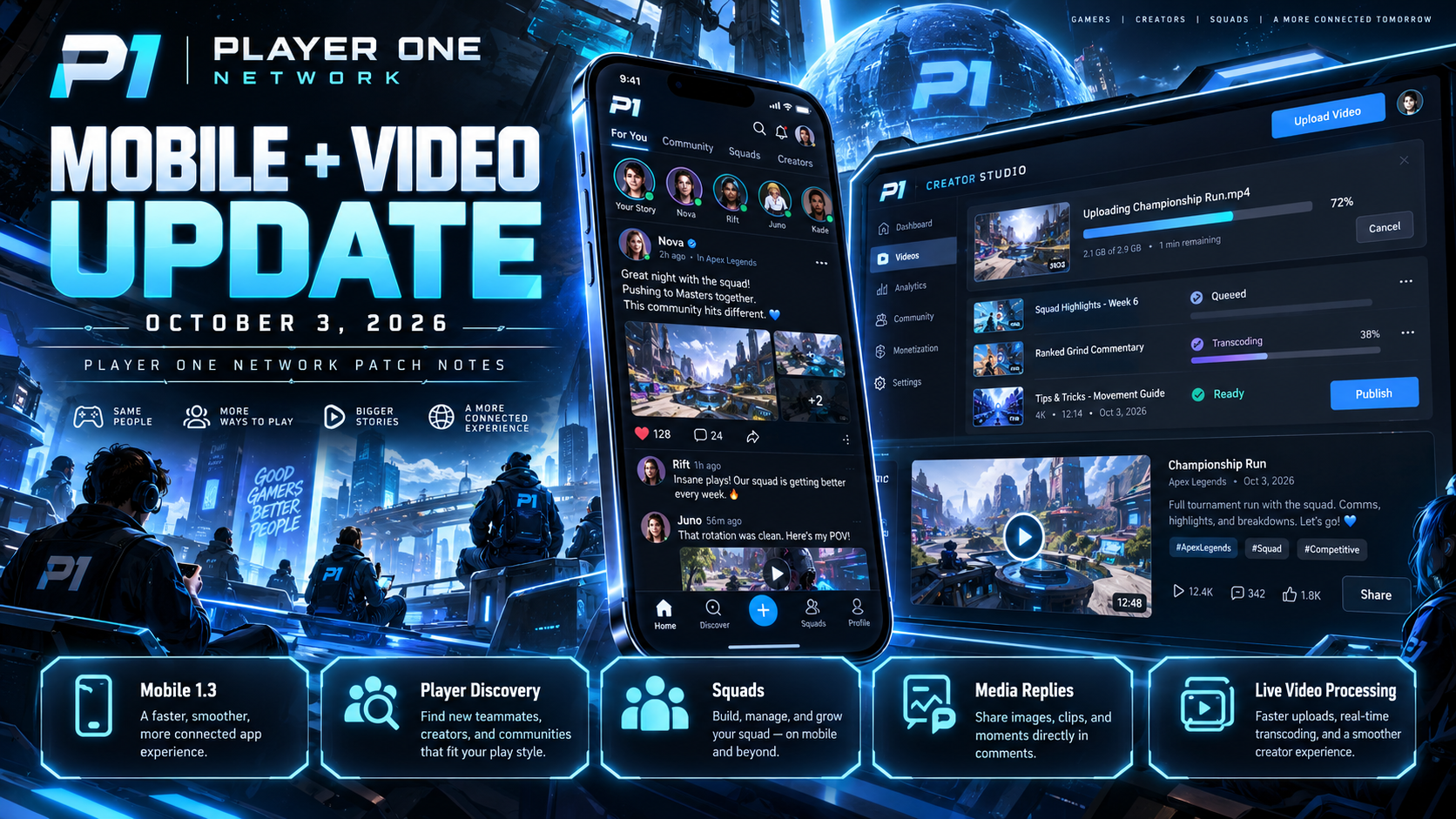
🎮 PLAYER ONE NETWORK — PATCH NOTES
Mobile + Video Update
October 3, 2026
Today brought another substantial round of improvements to Player One Network, with the majority of development focused on making the mobile experience more complete and connecting it more deeply with Player One Video.
The biggest goal was simple:
Make P1 easier to use from your phone without sacrificing the features available elsewhere on the network.
Today’s updates include major improvements to:
📱 Player One Mobile
👥 Player Discovery
🛡️ Squads
💙 Following
🔔 Push Notifications
🖼️ Lobby Comment Media
🎬 Video Uploads
⚙️ Transcoding Progress
📱 PLAYER ONE MOBILE 1.3
Player One Mobile received another major quality-of-life update today.
Versions 1.3.0 through 1.3.2 focus heavily on simplifying navigation, improving community interaction, expanding Lobby functionality, and bringing more creator tools directly onto mobile devices.
🌐 THE LOBBY — NEW MOBILE NAVIGATION
The Lobby experience has been reorganized to make its major community features easier to find.
Rather than hiding important functionality behind multiple screens, the updated mobile Lobby now places greater emphasis on three primary areas:
📰 Feed
Browse posts and activity from the Player One community.
👥 Players
Find and connect with other members of Player One Network.
🛡️ Squads
Browse and participate in P1 communities and groups.
The goal is to make the Lobby much easier to understand for new members while also reducing the number of steps experienced members need to take.
👥 FIND PLAYERS
One of the biggest additions to Mobile 1.3 is a dedicated Find Players experience.
Members can now search for other players directly through the Lobby.
Player discovery can use information such as:
- Display name.
- @username.
- Games.
- Platform information.
This makes it considerably easier to find friends, creators, squad members, or people with similar gaming interests.
🔎 BETTER PLAYER DISCOVERY
The new Players section is designed around more than simply searching for an exact username.
The goal is to make Player One Network a place where people can actually discover other players.
That includes finding members based on shared interests and activity instead of already needing to know exactly who you’re looking for.
Player discovery will continue to expand as the broader community system develops.
💙 SIMPLER FOLLOWING
Following another Player One member has been streamlined.
The mobile experience now provides clearer and faster follow controls directly where members are being discovered.
Improvements include:
- One-tap Follow controls.
- Faster visual feedback.
- More responsive follower-state changes.
- Cleaner follower presentation.
- Less navigation required.
Following someone should feel immediate rather than making the user wonder whether the action actually worked.
⚡ FASTER FOLLOW INTERACTIONS
The interface can now react immediately when the Follow button is pressed rather than waiting for every network action to finish before updating the screen.
That means interactions feel much more responsive.
This is part of a wider quality-of-life effort throughout Player One Mobile:
Actions should feel instant whenever possible.
🛡️ SQUADS HAVE ARRIVED ON MOBILE
Squads are now considerably more accessible from Player One Mobile.
Members can browse P1 Squads directly through the Lobby rather than requiring the desktop experience.
The mobile Squad experience includes:
- Squad browsing.
- Squad searching.
- Squad details.
- Member information.
- Joining Squads.
- Leaving Squads.
- Creating Squads.
This brings another major Player One community system directly into the mobile experience.
🔎 SEARCH FOR SQUADS
Squad discovery has also been improved.
Members can search for communities that interest them instead of manually browsing every available Squad.
This should make it much easier to find communities based around:
🎮 Games
🖥️ Platforms
🏆 Competitive play
🤝 Casual groups
💬 Community interests
🎬 Creators
Squads will continue becoming a larger part of how communities organize throughout P1.
➕ CREATE A SQUAD FROM MOBILE
Members can now access Squad creation directly from the mobile experience.
This makes forming a new community much more convenient without requiring users to switch to another device.
Creating and managing communities should eventually feel natural regardless of how you’re accessing Player One Network.
🧭 CLEANER MOBILE NAVIGATION
Navigation received another significant refinement today.
One of the priorities for Mobile 1.3 is making P1 understandable to people of different ages and different levels of technical experience.
The updated direction focuses on:
- Clearer labels.
- Fewer unnecessary steps.
- More predictable controls.
- Better organization.
- Easier access to important areas.
- Larger touch targets.
- More consistent icons.
- Less clutter.
The goal is for someone opening Player One Mobile for the first time to understand where things are without needing instructions.
🔔 PUSH NOTIFICATION ICON FIX
Push notifications were successfully reaching mobile devices, but there was an important visual issue.
On some Android devices, notifications could display a:
⬜ Small white box
instead of the proper Player One notification icon.
That has been corrected.
🎨 PROPER ANDROID NOTIFICATION ICON
The mobile application now uses a dedicated notification-safe version of the P1 icon.
This uses the transparent monochrome format Android expects for status-bar notifications.
The result should be a much cleaner Player One identity when notifications appear on supported Android devices.
🖼️ PHOTOS IN LOBBY COMMENTS & REPLIES
One of today’s largest Lobby improvements is the addition of proper media uploads within comments and replies.
Previously, members could interact with Lobby posts from mobile but attaching photos inside responses did not work correctly.
That experience has now been expanded.
📷 UPLOAD PHOTOS WHILE RESPONDING
Members can now attach images directly while writing Lobby comments or replies.
Supported image formats include:
- JPG
- PNG
- WebP
This makes conversations significantly more expressive and useful.
Members can now share things such as:
🎮 Screenshots
💻 Setup photos
🐛 Bug screenshots
😂 Reaction images
🖼️ Community images
📸 Photos
without having to create an entirely separate post.
👀 IMAGE PREVIEW BEFORE POSTING
Before sending an image response, users can preview the selected media.
This helps make sure the correct picture was selected before publishing it into the conversation.
Members can also:
- Remove the image.
- Replace it.
- Continue adding text.
- See upload status.
This makes comment-media uploading feel much closer to a modern social experience.
🖼️ IMAGE-ONLY RESPONSES
Text is no longer required when the image itself says everything.
Members can post an image-only comment or reply when appropriate.
This is particularly useful for screenshots, reactions, memes, and visual responses.
🧵 MEDIA INSIDE THREADED REPLIES
Images aren’t limited to top-level comments.
They can also appear inside the threaded reply system.
That means direct conversations can now contain media without breaking the discussion structure.
Replies remain associated with the comment they’re responding to.
🔍 FULL-SCREEN IMAGE VIEWER
Images shared inside Lobby discussions can also be opened into a larger viewer.
This is especially useful when someone shares:
- Screenshots with small text.
- Bug reports.
- Game screenshots.
- Setup images.
- Detailed photos.
Members can view the image without needing to leave the conversation.
📦 MOBILE IMAGE UPLOAD LIMIT
Comment and reply media currently supports image files up to:
8 MB
This helps balance image quality with mobile upload reliability.
🎬 PLAYER ONE VIDEO — UPLOAD PROGRESS EXPANSION
A major creator quality-of-life improvement was also introduced today for Player One Video.
Uploading a video previously created an uncomfortable period where creators knew they had submitted a file but had very little indication of what was happening afterward.
That experience is now being addressed.
📤 VIDEO UPLOAD STATUS
Creators can now see the current state of their uploads from their private video area.
Instead of wondering whether the upload worked, videos can clearly display states such as:
📤 Uploading
The original file is still being transferred.
⏳ Queued
The upload succeeded and the video is waiting to be processed.
⚙️ Transcoding
Player One Video is preparing the different playback versions.
✅ Ready
Processing has completed and the video is ready.
❌ Failed
Something went wrong and the creator can clearly see that processing did not complete.
📊 LIVE TRANSCODING PROGRESS
The biggest improvement is the ability to actually see transcoding progress.
Rather than only displaying a generic “Processing” message, the creator can see how far Player One Video has progressed.
This includes:
- Overall progress.
- Processing state.
- Individual video-quality progress.
- Clearer completion feedback.
Creators now have a much better idea of whether their video is actively being processed.
🎞️ QUALITY-BY-QUALITY PROGRESS
When Player One Video prepares multiple playback qualities, the progress interface can show how those individual versions are progressing.
This provides much more useful information than a single loading spinner.
Instead of:
“Processing…”
Creators can see that the system is genuinely moving through the different stages needed to prepare their upload.
📱 VIDEO PROCESSING STATUS ON MOBILE
This functionality has also been integrated into Player One Mobile.
Creators can open their private My Uploads area directly from their phone and see the current state of recently uploaded videos.
This creates a much better workflow for creators uploading from mobile devices.
Upload the video.
Continue using P1.
Check back on progress.
Watch it when it’s ready.
🔄 LIVE STATUS REFRESH
The upload-progress screen automatically refreshes processing information approximately every few seconds.
Creators don’t need to repeatedly reload the page just to find out whether something changed.
As the video moves through:
Uploading → Queued → Transcoding → Ready
the interface updates along with it.
▶️ WATCH WHEN READY
Once transcoding is complete, the status can transition into a Watch action.
That gives creators a clear indication that processing has finished and the video is available for playback.
No guessing required.
⚙️ PROCESSING CONTINUES IN THE BACKGROUND
Creators don’t need to remain on the progress screen while their video is transcoding.
Processing continues normally in the background.
The My Uploads interface is simply there so creators can check the status whenever they want.
This makes the workflow much less restrictive.
🎯 WHY THIS VIDEO UPDATE MATTERS
Video transcoding can take time, especially when Player One needs to prepare multiple playback versions.
Without status information, that waiting period can make it look like something has gone wrong.
The new system communicates:
Your upload succeeded.
Player One is working on it.
Here’s how far along it is.
That gives creators considerably more confidence when uploading content.
📋 MOBILE 1.3.0 HIGHLIGHTS
👥 New Players section
🔎 Search players by name, username, game, and platform
💙 Simplified one-tap following
⚡ Faster follow interaction feedback
🛡️ Squads available from the Lobby
🔎 Squad browsing and search
➕ Create Squads from mobile
🤝 Join and leave Squads
🧭 Cleaner Lobby navigation
📱 Simpler mobile experience
🔔 Android push-notification icon corrected
📋 MOBILE 1.3.1 HIGHLIGHTS
🖼️ Photo uploads added to Lobby comments
📷 Photo uploads added to threaded replies
👀 Image previews before posting
🔄 Remove or replace selected images
📤 Upload-status feedback
🖼️ Image-only comments supported
🧵 Images supported inside threaded conversations
🔍 Full-screen image viewing
📦 Up to 8 MB image uploads
📋 MOBILE 1.3.2 + VIDEO HIGHLIGHTS
🎬 New private My Uploads experience
📤 Uploading status
⏳ Processing queue status
⚙️ Live transcoding progress
🎞️ Quality-specific processing information
📊 Overall completion percentage
✅ Ready state
❌ Clear failure state
🔄 Automatic status refreshing
▶️ Watch action when processing completes
📱 Upload/transcoding progress available on mobile
🌐 MOBILE IS BECOMING A FULL P1 EXPERIENCE
Player One Mobile started as a way to access parts of the network from a phone.
It is increasingly becoming a complete way to participate in Player One Network.
Members can now use mobile for:
💬 Lobby conversations
🖼️ Media replies
👥 Finding players
💙 Following members
🛡️ Squads
📊 Polls
@️⃣ Mentions
👤 Profiles
🔔 Notifications
🎬 Video
📤 Upload tracking
⚙️ Transcoding monitoring
And development is continuing.
💙 BETTER FOR PLAYERS. BETTER FOR CREATORS.
Today’s updates focused less on flashy new screens and more on removing friction.
Finding another player should be easy.
Following them should be easy.
Joining a Squad should be easy.
Sharing a screenshot should be easy.
And after uploading a video, creators shouldn’t have to wonder:
“Is it actually doing anything?”
Player One Network should communicate clearly what is happening and make interacting with the community feel natural.
That’s what today’s updates move us closer toward.
🎮 PLAYER ONE NETWORK — OCTOBER 3 UPDATE
More connected. More transparent. More mobile.
Play. Create. Connect. Together. 💙
— Player One Network
COMMUNITY DISCUSSION
Join the conversation