
Image Gallery + Mobile Update
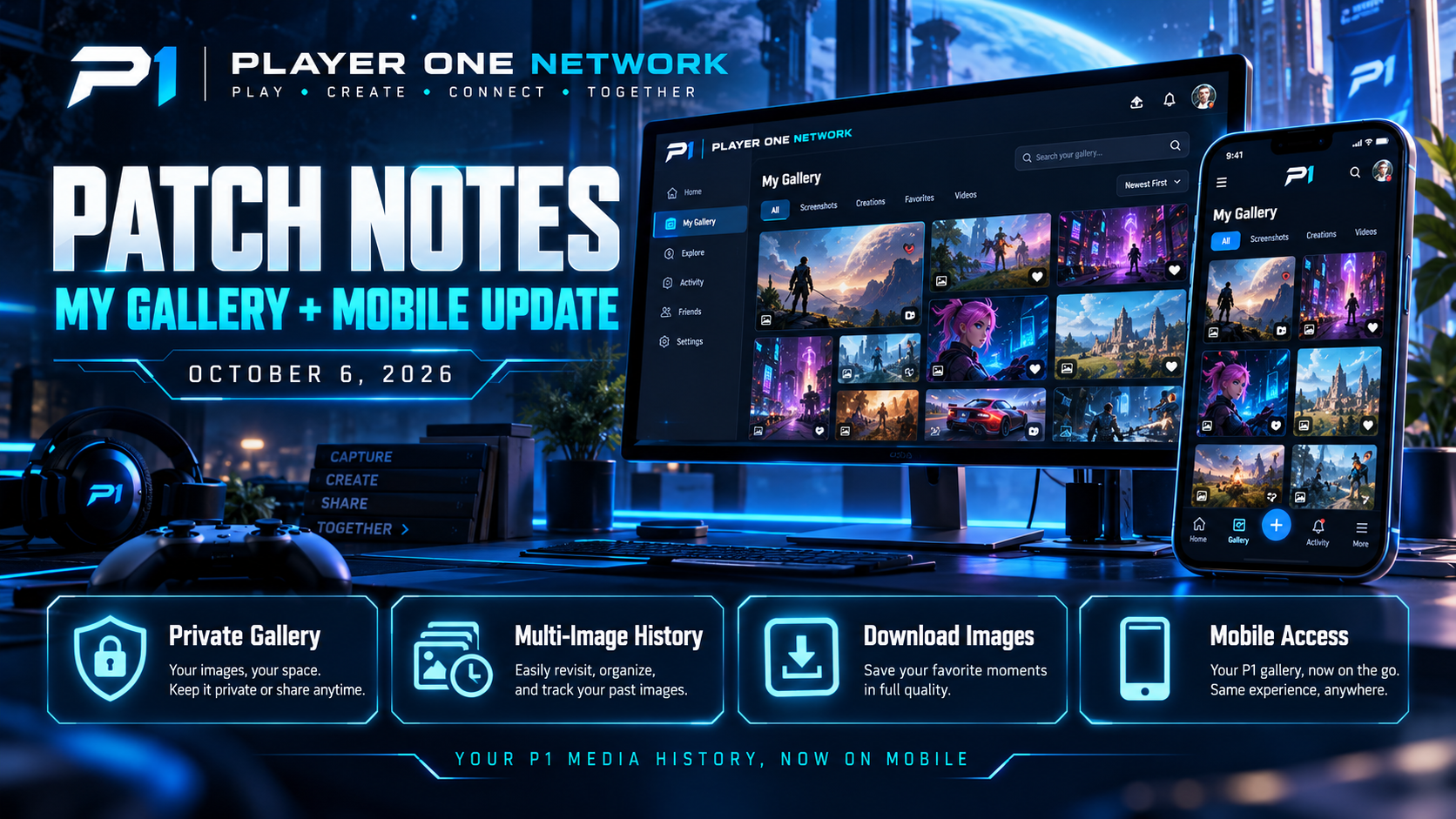
🎮 PLAYER ONE NETWORK — PATCH NOTES Image Gallery + Mobile Update October 6, 2026 Today's Player One Network update introduces a brand-new way for members to revisit the images they've shared throughout The…
🎮 PLAYER ONE NETWORK — PATCH NOTES
Image Gallery + Mobile Update
October 6, 2026
Today’s Player One Network update introduces a brand-new way for members to revisit the images they’ve shared throughout The Lobby.
We’re introducing a personal Image Gallery built around your own Lobby media history — and we’ve already expanded it into Player One Mobile.
This update is focused on making your uploaded content easier to find, revisit, download, and manage wherever you’re using P1.
🖼️ INTRODUCING — MY GALLERY
One of today’s biggest additions is the new:
My Gallery
Every member can now have a private gallery containing images they’ve previously shared through The Lobby.
Instead of trying to remember which post contained a particular screenshot or photo, your media history can now live in one organized place.
🔒 YOUR OWN PRIVATE IMAGE HISTORY
My Gallery is designed specifically around your own uploaded images.
Other members aren’t browsing through your private gallery.
It’s your personal media history within Player One Network.
This provides a much easier way to revisit things you’ve shared over time without turning the feature into another public social feed.
🕒 SEE YOUR LOBBY IMAGE HISTORY
Images you’ve shared through Lobby activity can now be collected into your Gallery.
That includes media from older posts as well as newer activity.
The system is also designed to account for images connected with:
- Single-image posts.
- Multi-image posts.
- Previous Lobby uploads.
- Media whose original post may no longer be available.
This gives members a more complete history of the media they’ve contributed.
🖼️ MULTI-IMAGE POST SUPPORT
The Gallery works alongside the recently expanded multi-image Lobby posting system.
When a post contains several photos, those images can still appear individually inside your Gallery.
This means your media history isn’t limited to only the first image from a post.
Each image can remain part of your personal collection.
⬇️ DOWNLOAD YOUR IMAGES AGAIN
One of the most useful additions is the ability to download your previously uploaded images again.
Maybe you:
- Deleted the original from your phone.
- Need an old screenshot again.
- Want to save a picture you previously shared.
- Switched devices.
- Simply want your own copy back.
The Gallery gives you a way to return to that media without hunting through months of Lobby posts.
🔗 VIEW THE ORIGINAL POST
Gallery images can also connect back to their original Lobby post when that post is still available.
Using View Post, members can move from an image directly back into the conversation where it was originally shared.
This makes the Gallery useful for more than image storage.
It becomes another way of revisiting your own P1 history.
🗑️ MEDIA HISTORY CAN OUTLIVE A POST
The Gallery is also designed to better preserve your personal media history when an associated Lobby post is no longer available.
That means an image doesn’t necessarily have to disappear from your own Gallery just because the original conversation changed later.
The goal is to make My Gallery a more reliable personal archive of the images you’ve uploaded to P1.
📝 IMAGE INFORMATION
Gallery entries can include useful context surrounding an upload.
Depending on the available information, members can see details connected with their media history instead of looking at one enormous folder of unexplained files.
This helps make older images easier to recognize and revisit.
📚 PAGINATED GALLERY BROWSING
As members upload more images, the Gallery is designed to grow with them.
Rather than attempting to load an entire media history at once, Gallery content can be browsed progressively.
This keeps the experience more manageable as somebody’s collection becomes larger.
📱 MY GALLERY COMES TO PLAYER ONE MOBILE
We didn’t want the new Gallery to remain limited to the desktop experience.
Today’s update also brings My Gallery directly into Player One Mobile.
Player One Mobile 1.3.6
Members can now access their personal Lobby image history directly from their phone or tablet.
🧭 GALLERY ACCESS THROUGH THE MOBILE LOBBY
The Gallery has been integrated directly into the mobile Lobby experience.
Members can reach it through multiple natural areas of the app instead of having to search for a hidden settings page.
Gallery access has been introduced through areas including:
📱 Lobby navigation
☰ Mobile menu
👤 Your own profile
This makes your media history much easier to reach wherever you’re already interacting with P1.
📱 RESPONSIVE MOBILE GALLERY
The Gallery interface adapts to mobile displays using a responsive image grid.
Rather than presenting desktop-sized media cards on a phone, images are organized around the available screen space.
The goal is a familiar gallery-style browsing experience that feels appropriate on:
- Phones.
- Tablets.
- Larger mobile displays.
🔍 FULL-SCREEN IMAGE VIEWING
Gallery images can be opened for a larger view directly inside Player One Mobile.
This is particularly useful for:
🎮 Game screenshots
💻 Setup photos
🐛 Bug screenshots
📸 Personal photos
🖼️ Detailed images
Members don’t have to leave the Gallery simply to inspect an image more closely.
⬇️ SAVE YOUR OLD MEDIA FROM MOBILE
The ability to revisit your uploaded images is especially useful on mobile.
Your Player One media history can now serve as a convenient place to recover pictures you’ve previously shared.
That means an old Lobby upload can potentially become much easier to retrieve even after moving to another device.
🔗 RETURN TO THE CONVERSATION
Just like the main Gallery experience, Mobile can provide View Post access when the original Lobby post still exists.
This creates a useful connection between:
Gallery → Image → Original Lobby conversation
rather than treating the Gallery as an isolated photo folder.
🔄 REFRESH YOUR GALLERY
The mobile Gallery includes a straightforward Refresh option so recently uploaded media can be pulled into the view.
Members can continue using The Lobby, share new images, return to their Gallery, and refresh the collection without unnecessary navigation.
➕ LOAD MORE
Large galleries can also progressively load additional media.
This helps keep initial loading more manageable while still giving longtime members access to a growing image history.
Your Gallery can expand without requiring every image you’ve ever uploaded to load simultaneously.
🖼️ BETTER SUPPORT FOR HOW P1 STORES MEDIA
Additional compatibility work was completed so the mobile experience can recognize Gallery media more reliably.
This helps ensure that images uploaded through different Lobby workflows can still appear correctly inside the mobile Gallery.
For members, the important part is simple:
Your Lobby media should show up where you expect it.
📸 MULTI-IMAGE POSTS REMAIN FULLY SUPPORTED ON MOBILE
The Gallery update builds on the recent work that added multiple images inside a single Lobby post.
Mobile support continues to recognize those multi-image posts rather than collapsing the experience back into a single-photo system.
This allows both the Lobby feed and personal Gallery to work together around richer image sharing.
🌐 YOUR CONTENT, ACROSS P1
The Gallery represents another example of different parts of Player One Network beginning to work together.
An image can now move through a connected experience:
📤 Upload it to The Lobby
↓
📰 Share it with the community
↓
🖼️ Find it later in My Gallery
↓
📱 Revisit it through Mobile
↓
🔗 Return to the original conversation
↓
⬇️ Download it again when needed
Instead of uploads simply disappearing into an old feed, your content can remain useful to you.
📋 THE LOBBY 2.1.6 HIGHLIGHTS
🖼️ New private My Gallery
🕒 Personal Lobby image history
📸 Multi-image post history supported
⬇️ Download previously uploaded images
🔗 View original Lobby posts
🗑️ Improved preservation of personal media history
📝 Additional media information
📚 Progressive Gallery browsing
🔒 Gallery content remains private to its owner
📋 MOBILE 1.3.6 HIGHLIGHTS
📱 My Gallery added to Player One Mobile
🧭 Gallery access through Lobby navigation
☰ Gallery access through the mobile menu
👤 Gallery accessible from your own profile
🖼️ Responsive mobile image grid
🔍 Full-screen image viewing
🔗 View Post integration
🔄 Gallery Refresh
➕ Load More for larger collections
📸 Multi-image compatibility retained
🖼️ Improved Lobby media recognition
💙 YOUR PLAYER ONE HISTORY
Social platforms move quickly.
A screenshot you shared today can be buried beneath hundreds of posts a few months from now.
My Gallery gives members a way to keep those images within reach.
Not as another public feed.
Not as another content channel.
But as your own personal history of the media you’ve shared through Player One Network.
And now that history can follow you onto mobile too.
🖼️ WELCOME TO MY GALLERY
More connected.
More personal.
More useful.
Play. Create. Connect. Together. 💙
— Player One Network
COMMUNITY DISCUSSION
Join the conversation