
Player One Forums Patch Notes — Navigation + Channel Design Update
💬 PLAYER ONE NETWORK — FORUMS PATCH NOTES Forums 0.3.10 Alpha November 5, 2026 Today’s Player One Network update focused entirely on improving the Forums experience. This release is primarily about making the Forums…
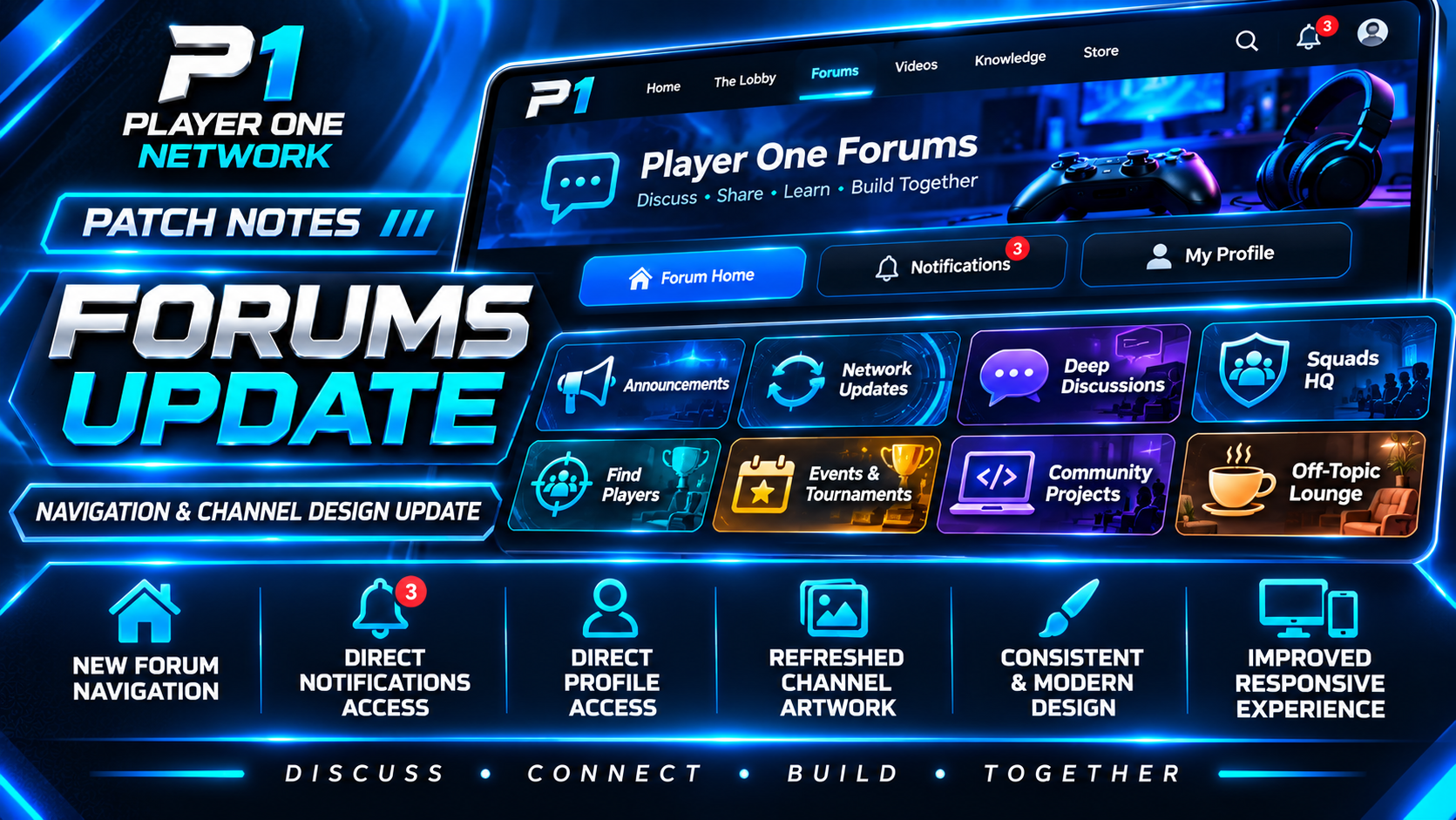
💬 PLAYER ONE NETWORK — FORUMS PATCH NOTES
Forums 0.3.10 Alpha
November 5, 2026
Today’s Player One Network update focused entirely on improving the Forums experience.
This release is primarily about making the Forums easier to navigate, more visually consistent, and much more polished across the different community channels.
The biggest changes include:
🧭 New Forum navigation
🔔 Direct Notifications access
👤 Direct Profile access
🎨 Major channel artwork overhaul
✨ Better hover and active states
📱 Improved responsive behavior
🖼️ More consistent Forum channel identity
🧭 NEW FORUM NAVIGATION
One of today’s biggest changes is a completely redesigned navigation area for Player One Forums.
The Forums now include a dedicated segmented navigation system with quick access to:
🏠 Forum Home
Return directly to the main Forum experience.
🔔 Notifications
Quickly access Forum and community activity that needs your attention.
👤 My Profile
Jump directly to your Player One profile.
This gives frequently used Forum destinations a much clearer home instead of making members rely entirely on the broader network navigation.
🎨 HERO-INTEGRATED NAVIGATION
The new navigation has been designed to feel like part of the Forum header rather than another unrelated menu.
The updated presentation uses:
- Dark translucent surfaces.
- Subtle layered transparency.
- Player One blue accents.
- Cleaner spacing.
- Better visual hierarchy.
- More compact controls.
The goal is to keep important actions easily available without overcrowding the Forum header.
✨ NEW HOVER STATES
Forum navigation now provides clearer feedback when interacting with different controls.
Hovering over an option gives it a more visible interactive state, helping members immediately understand which element they are about to select.
This makes the interface feel more responsive without relying on excessive animation or glow effects.
🔵 CLEARER ACTIVE PAGE INDICATOR
The navigation now also makes it easier to identify where you currently are.
Active destinations use a restrained Player One blue treatment with a cleaner bottom accent.
Instead of every button competing for attention, only the active area receives the stronger emphasis.
This makes navigating between Forum Home, Notifications, and your Profile easier to understand at a glance.
🔔 NOTIFICATION COUNT PRESERVED
The updated navigation keeps the existing notification-count behavior.
If you have activity waiting for you, the Notifications area can still communicate that directly from the Forum header.
This keeps important community activity visible while fitting it into the redesigned navigation.
📱 BETTER TABLET & MOBILE BEHAVIOR
The new Forum navigation has also been designed with smaller screens in mind.
Rather than forcing the full desktop layout into limited space, the navigation can adapt and collapse more appropriately on:
📱 Phones
🖥️ Tablets
💻 Smaller desktop windows
This helps prevent cramped controls and keeps the most important Forum actions usable across different devices.
🖼️ MAJOR FORUM CHANNEL ARTWORK OVERHAUL
Today’s other major update is a large visual redesign of the newer Forum channels.
Several channels were functional but their backgrounds did not yet match the quality or depth of the original Forum artwork.
Those backgrounds have now been rebuilt around the same stronger visual standard.
📢 ANNOUNCEMENTS
The Announcements channel now has a more distinct visual identity built around a dedicated megaphone concept.
This makes the channel immediately recognizable as the place for important Player One community announcements.
The updated background better separates it from ordinary discussion channels.
🔄 NETWORK UPDATES
The Network Updates channel received new artwork built around:
- Sync imagery.
- Circular motion elements.
- Update-style rings.
- Time/clock-inspired details.
The goal is to visually communicate ongoing changes and development across Player One Network before someone even reads the channel title.
💬 DEEP DISCUSSIONS
Deep Discussions now uses conversation-focused artwork built around layered discussion bubbles.
The visual direction better reflects the purpose of the channel:
Longer conversations.
Different viewpoints.
Topics that deserve more than a quick response.
🛡️ SQUADS HQ
The Squads HQ channel received a team-focused redesign built around a shield and group identity.
This helps visually connect the Forum channel with the wider My Squads experience throughout Player One Network.
Squads HQ should now immediately feel like a community/team-oriented destination.
🎯 FIND PLAYERS
The Find Players channel now uses radar-inspired artwork.
This gives the channel a much clearer visual meaning:
Find people.
Find teammates.
Build connections.
Instead of relying entirely on text, the artwork helps communicate its purpose immediately.
📅 EVENTS & TOURNAMENTS
The Events & Tournaments channel received a redesigned background based around calendar and event imagery.
This better represents community events, scheduled activities, competitions, and tournaments happening across P1.
💻 COMMUNITY PROJECTS
The Community Projects channel has also been upgraded.
Its new visual identity incorporates:
📁 Project/folder concepts
💻 Code imagery
🛠️ Collaborative development themes
This makes it a much stronger home for members who want to build, create, collaborate, or share ongoing projects with the community.
☕ OFF-TOPIC LOUNGE
The Off-Topic Lounge received a more relaxed visual identity built around a lounge and coffee-inspired concept.
Not every conversation needs to be about games, technology, or development.
This channel is intended to feel more casual, and its new artwork now reflects that.
🎨 CONSISTENT CHANNEL ART DIRECTION
The channel update wasn’t simply a collection of different background images.
Each redesigned channel now follows the same overall visual structure.
That includes:
- Right-side subject composition.
- Left-to-right image fading.
- Layered gradients.
- Controlled highlights.
- Subtle glow effects.
- Better shadows and depth.
- More natural blending into Forum cards.
The goal is consistency without making every channel look identical.
📐 STANDARDIZED CHANNEL PRESENTATION
The newer channel backgrounds have also been brought closer to the same proportions and visual quality used by the original flagship Forum artwork.
This creates a much more cohesive Forum directory.
Instead of some channels appearing highly polished while others look noticeably simpler, the experience now feels far more unified.
🌌 MORE DEPTH WITHOUT MORE CLUTTER
A major part of today’s visual work was improving depth without returning to overly complicated or excessively “bubbly” design.
The updated channel art relies more on:
- Layering.
- Lighting.
- Composition.
- Fading.
- Contrast.
rather than simply adding more borders or effects.
This helps preserve the cleaner Player One Network design direction while still making channels feel visually distinct.
🗂️ EASIER CHANNEL RECOGNITION
With the new artwork, channels are easier to distinguish even before reading every label.
That becomes increasingly important as the Forum continues to grow.
Members should be able to quickly recognize areas such as:
📢 Announcements
🔄 Network Updates
💬 Deep Discussions
🛡️ Squads HQ
🎯 Find Players
📅 Events & Tournaments
💻 Community Projects
☕ Off-Topic Lounge
through both their names and their visual identities.
📋 FORUMS 0.3.10 ALPHA HIGHLIGHTS
Today’s major changes include:
🧭 New segmented Forum navigation
🏠 Dedicated Forum Home shortcut
🔔 Direct Notifications access
👤 Direct My Profile access
✨ New navigation hover states
🔵 Clearer active-page highlighting
🔔 Notification counts retained
📱 Responsive navigation improvements
🎨 Major channel-art redesign
📢 New Announcements artwork
🔄 New Network Updates artwork
💬 New Deep Discussions artwork
🛡️ New Squads HQ artwork
🎯 New Find Players artwork
📅 New Events & Tournaments artwork
💻 New Community Projects artwork
☕ New Off-Topic Lounge artwork
🖼️ More consistent channel presentation
🌌 Improved gradients, lighting, glow, and depth
📐 More cohesive artwork dimensions and composition
💙 A MORE COMPLETE FORUM EXPERIENCE
Today’s update is less about adding another massive system and more about improving the experience members interact with every time they enter the Forums.
Navigation is easier to understand.
Important destinations are easier to reach.
Channels are easier to recognize.
And the Forum visual identity is becoming much more consistent across the entire community.
These kinds of updates are an important part of moving Player One Forums from an early Alpha foundation toward a more complete P1 community experience.
💬 PLAYER ONE FORUMS CONTINUE TO EVOLVE
More improvements will continue as the Forums grow alongside the rest of Player One Network.
For now, Forums 0.3.10 represents another major visual and usability step forward.
Start a conversation. Find your community. Build something together.
Play. Create. Connect. Belong. 💙
— Player One Network
COMMUNITY DISCUSSION
Join the conversation