
Player One Network Patch Notes — Mobile + Lobby Update
🎮 PLAYER ONE NETWORK — PATCH NOTES Mobile + The Lobby Update November 6, 2026 Today’s Player One Network development focused heavily on two areas: 📱 Player One Mobile💬 The Lobby Mobile received another…
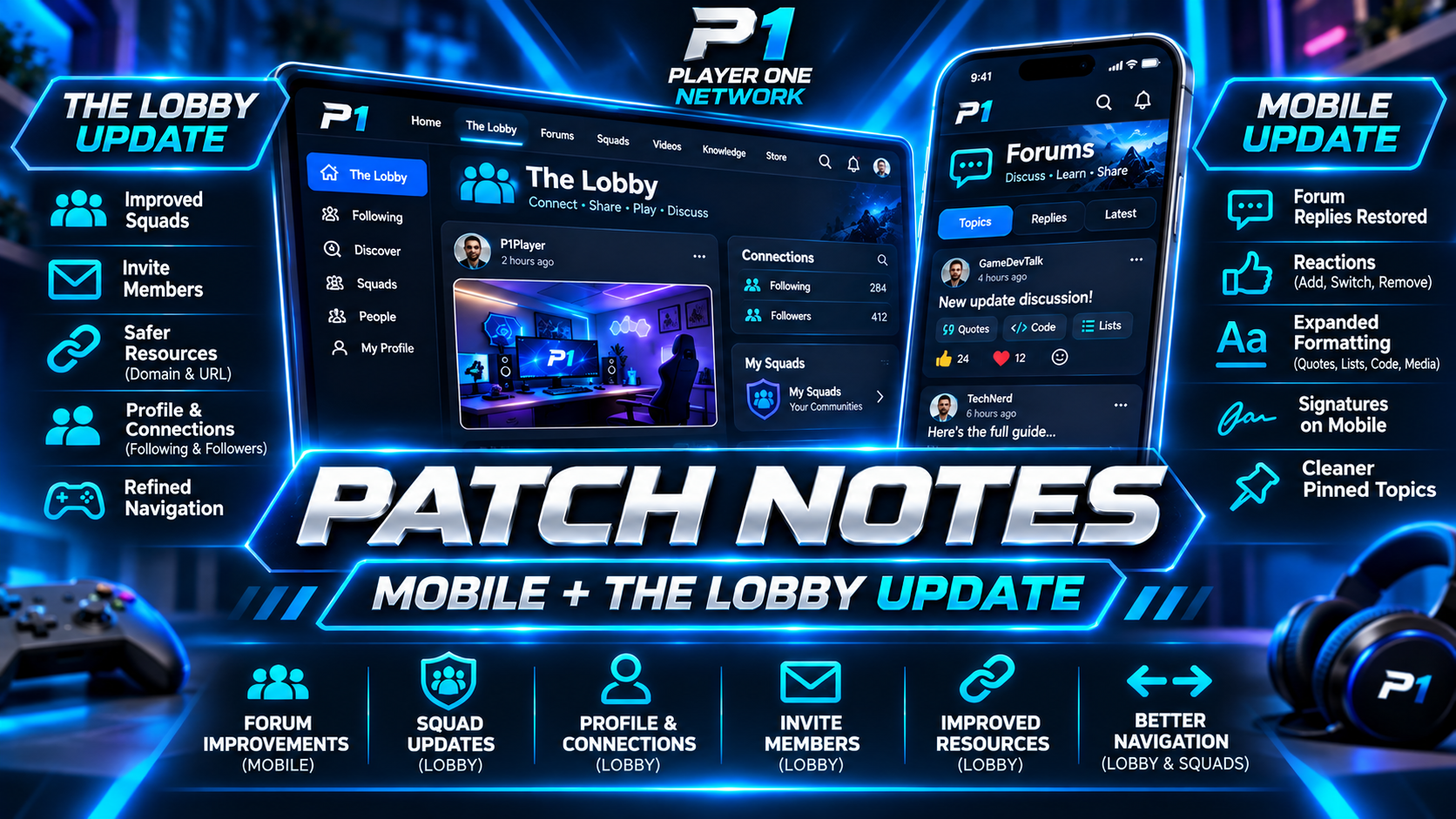
🎮 PLAYER ONE NETWORK — PATCH NOTES
Mobile + The Lobby Update
November 6, 2026
Today’s Player One Network development focused heavily on two areas:
📱 Player One Mobile
💬 The Lobby
Mobile received another significant round of Forum improvements, while The Lobby expanded profiles, connections, Squads, invitations, resource links, and navigation.
The overall goal remains the same:
Make every part of Player One feel more connected, easier to navigate, and consistent across the network.
📱 PLAYER ONE MOBILE 2.0.5–2.0.9
Player One Mobile received several rapid updates today focused primarily on bringing the Forums experience much closer to the full Player One experience.
These updates address replies, reactions, profiles, formatting, signatures, pinned topics, and overall discussion accuracy.
💬 FORUM REPLIES RESTORED
A major issue caused Forum topics to display correctly while their replies did not appear as expected.
That has been corrected.
Mobile Forum topics can once again properly display the conversation underneath the original post.
This includes:
- Original topic content.
- Individual replies.
- Reply authors.
- Post information.
- Reactions.
- Signatures.
- Formatting.
Longer Forum discussions should now feel significantly more complete on mobile.
👤 CORRECT REPLY AUTHORS
Another important issue caused replies to appear as though they were all written by the same member.
That obviously made conversations extremely confusing.
Reply identity handling has now been improved so individual posts can correctly display their actual authors.
This includes better handling of:
- Display names.
- Profile identity.
- Avatars.
- Post numbers.
- Member information.
Each response should now look like it belongs to the person who actually wrote it.
🖼️ BETTER FORUM AVATARS
Forum avatars have received additional reliability improvements on Mobile.
Member images now stay more closely connected to the correct author instead of falling back to the wrong profile or displaying inconsistently throughout a topic.
This helps make long discussions much easier to follow visually.
✍️ SIGNATURES RETURN TO MOBILE
Forum signatures are once again part of the mobile discussion experience.
Members who use Forum signatures can have them displayed beneath their posts without overwhelming the rest of the conversation.
The presentation keeps signatures visually separate from the actual post content.
😀 FORUM REACTIONS NOW WORK
Forum reactions received a substantial functionality update.
Members can now interact with reactions directly from Mobile.
Reaction support includes:
- Adding a reaction.
- Switching reactions.
- Removing an existing reaction.
- Updating reaction totals without leaving the discussion.
This makes Forum participation much faster and more natural from a phone.
⚡ REACTION COUNTS UPDATE IN PLACE
Members no longer need to manually reload a Forum topic simply to see whether their reaction registered.
Reaction counts can update directly within the current discussion.
The result is a much smoother interaction experience.
📝 EXPANDED FORUM FORMATTING
One of today’s biggest Mobile Forum improvements is much broader formatting support.
Forum posts can now better interpret content such as:
Bold text
Italic text
Links
Quotes
Lists
Code
Media
Spoilers
Videos
and other supported Forum formatting.
This is especially important for longer discussions, guides, technical posts, and conversations created through the desktop Forums.
🔗 CLICKABLE FORUM LINKS
Links included inside Forum posts now behave much more naturally on Mobile.
Instead of showing formatting markup or broken text, supported links can appear as actual interactive links.
This makes posts containing sources, references, videos, guides, or other P1 destinations significantly more useful.
💬 BETTER QUOTE PRESENTATION
Quoted Forum content is now handled more accurately on Mobile.
Members can more clearly distinguish:
What someone previously said
from
The new response.
This is especially useful inside larger threads where several conversations may be taking place simultaneously.
💻 CODE & LIST SUPPORT
Technical discussions also benefit from the expanded formatting system.
Posts containing:
- Code blocks.
- Ordered lists.
- Unordered lists.
- Structured formatting.
can now retain much more of their intended presentation.
This brings the Mobile Forums closer to the complete desktop discussion experience.
🚫 NON-FLOATING REPLY COMPOSER
The Forum reply box has been adjusted so it no longer awkwardly floats alongside the discussion while members scroll through posts.
The composer now behaves more naturally within the page.
This creates:
- More room for reading.
- Less obstruction.
- Better scrolling.
- Cleaner discussion layouts.
📌 PINNED TOPIC CLEANUP
Pinned Forum topics received another visual fix today.
Previously, a pinned discussion could show both:
📌 A pin indicator
and
A huge “PINNED” label
at the same time.
The oversized wording has now been removed.
Pinned topics retain a smaller, cleaner visual indicator without allowing the status label to overpower the actual topic title.
🧹 CLEANER TOPIC TITLES
The removal of unnecessary PINNED / STICKY title prefixes makes Forum lists much easier to scan.
The topic title is once again the main focus.
Status information remains visible without competing with the conversation itself.
📋 MOBILE UPDATE HIGHLIGHTS
Today’s major Player One Mobile improvements include:
💬 Forum replies restored
👤 Correct reply authors
🖼️ Improved author avatars
✍️ Forum signatures restored
😀 Functional Forum reactions
🔄 Add, switch, and remove reactions
⚡ Reaction totals update directly
📝 Expanded Forum formatting support
🔗 Improved link rendering
💬 Better quote presentation
📋 List formatting support
💻 Code formatting support
🎬 Media and video formatting improvements
🙈 Spoiler support improvements
📝 Non-floating reply composer
📌 Cleaner pinned-topic presentation
🧹 Oversized PINNED wording removed
💬 THE LOBBY 2.3.12–2.3.14
The Lobby also received another substantial community update today.
This development cycle focused heavily on:
👥 Member connections
🛡️ Squads
🔗 Community resources
📩 Invitations
👤 Profiles
🧭 Navigation
These changes continue moving The Lobby toward becoming the central social layer connecting Player One Network.
🛡️ CLEANER SQUAD NAVIGATION
Squad navigation received another cleanup pass.
Several redundant Home controls were being displayed throughout the Squad experience.
Those unnecessary duplicate navigation elements have now been removed.
The result is a cleaner interface where members can move between:
🏠 Home
🗂️ Spaces
👥 Members
••• More
without repeated buttons occupying valuable space.
🖱️ CLICKABLE SQUAD CARDS
Squad cards are now more directly interactive.
Instead of requiring members to hunt for a small button or link, the Squad card itself can act as the destination.
This makes:
- Discovering Squads.
- Returning to your communities.
- Browsing Squad lists.
much faster and more intuitive.
🧭 SMARTER SQUAD NAVIGATION
Navigation inside Squads has been made more reliable.
The Lobby now does a better job remembering where a member was navigating.
That includes information such as:
- Current Squad.
- Current section.
- Active tab.
- Current Space.
This helps prevent situations where the interface unexpectedly returns someone to the wrong area.
🔄 BETTER BACK/FORWARD NAVIGATION
Squad navigation also works more naturally with normal browser history.
Moving between different areas of a Squad should feel more predictable when using:
⬅️ Back
or
➡️ Forward
This brings My Squads closer to behaving like a complete community application rather than a collection of disconnected panels.
📩 INVITE COMMUNITY MEMBERS
Squad owners and authorized members now have a much better way to invite people from the Player One community.
The new invitation experience allows members to search for another P1 user using information such as:
- Display name.
- @username.
This makes inviting someone much easier than requiring exact account information.
🔎 SMART MEMBER SEARCH
Squad invitations now use a more useful community-member search.
The system can avoid unnecessarily showing people who:
- Already belong to the Squad.
- Already have a pending invitation.
This keeps invitation results cleaner and reduces duplicate requests.
🔔 SQUAD INVITE NOTIFICATIONS
When someone is successfully invited into a Squad, the invitation can connect into Player One’s notification experience.
This provides clearer feedback for invited members and better connects Squads with the larger P1 community system.
🔗 SAFER EXTERNAL SQUAD RESOURCES
Squad Resources received another important usability improvement.
Communities can link useful external destinations, but members now receive clearer information before leaving Player One Network.
The confirmation experience can show:
The destination website
and
The full destination URL
before the member continues.
This gives users more context about where a community resource is taking them.
🌐 DESTINATION DOMAIN LABELS
External resources now communicate their destination more clearly.
Members can see the website/domain associated with the resource instead of relying solely on the Squad-provided resource title.
This makes external links easier to understand before opening them.
👻 RESOURCE VISUAL IMPROVEMENTS
Squad Resource cards also received additional visual polish.
Destination-related imagery and subtle background treatments help separate external resources while keeping them consistent with the overall Player One interface.
The existing external-site warning remains part of the experience.
👤 MY PROFILE — MAJOR CONNECTIONS EXPANSION
Player profiles received one of today’s largest Lobby improvements.
The profile experience now includes a dedicated:
Connections
area.
This gives members a much clearer way to understand and manage the people connected to their Player One identity.
👥 FOLLOWERS & FOLLOWING
Profiles can now surface dedicated views for:
Following
People you currently follow.
Followers
People who currently follow you.
This turns follower information into something members can actually explore rather than simply displaying two numbers.
🔎 SEARCH YOUR CONNECTIONS
Follower and Following lists can also be searched.
This becomes increasingly useful as someone’s network grows.
Instead of manually scrolling through hundreds of accounts, members can search for the person they’re trying to find.
💙 FOLLOW CONTROLS INSIDE CONNECTIONS
Members can also manage follow relationships directly from the Connections experience.
This helps reduce unnecessary navigation between:
- Profiles.
- The Lobby.
- Creator channels.
- Connection lists.
The larger goal is a consistent relationship system throughout Player One Network.
🎨 PROFILE REDESIGN
The wider profile experience also received additional visual refinement.
The updated direction focuses on:
- Better content organization.
- Cleaner identity presentation.
- Better spacing.
- Stronger profile hierarchy.
- Easier access to community information.
Profiles should increasingly feel like the central representation of a member across P1.
🎮 COMPACT PINNED LOADOUT
The Pinned Loadout area has also been made more compact.
The previous presentation could occupy too much space compared with the rest of the profile.
The updated version keeps the information available while reducing how much visual attention it demands.
This leaves more room for the areas of a profile members are most likely to interact with.
🌐 BETTER CONNECTED PROFILES
These profile improvements fit into the wider goal of connecting identity throughout P1.
The same member can appear across:
💬 The Lobby
🎬 Video
📚 Knowledge
💬 Forums
🛡️ Squads
📱 Mobile
Their follower relationships and profile identity should continue to make sense regardless of which P1 system you’re currently using.
📋 THE LOBBY UPDATE HIGHLIGHTS
Today’s major Lobby changes include:
🛡️ Cleaner Squad navigation
🏠 Redundant Squad Home buttons removed
🖱️ Squad cards made directly clickable
🧭 More reliable section navigation
🗂️ Improved Space/tab persistence
⬅️➡️ Better browser Back/Forward behavior
📩 New Invite a Community Member experience
🔎 Search invites by display name or @username
🧹 Existing and pending members filtered from invite results
🔔 Squad invite notifications
🔗 Improved external Resource confirmations
🌐 Destination domains displayed
🔍 Full external URLs shown before leaving P1
🎨 Resource-card visual improvements
👤 Profile redesign
👥 New Connections section
💙 Following and Followers views
🔎 Searchable connections
➕ Follow controls from Connections
🎮 More compact Pinned Loadout
🌐 MORE CONNECTED THAN BEFORE
Today’s Mobile and Lobby updates might appear to focus on different parts of Player One Network, but they share the same larger objective.
A Forum reply should correctly represent who wrote it.
A Squad should remember where you were.
An invitation should find the correct person.
A resource link should tell you where it goes.
A profile should help you understand the people you’re connected to.
All of those details contribute to the same thing:
A network that actually feels connected.
💙 PLAYER ONE CONTINUES TO EVOLVE
Player One Network has reached a point where development isn’t only about introducing new features.
It’s increasingly about making those features communicate with each other correctly and making the overall experience easier to understand.
Today’s updates continue that work across both Player One Mobile and The Lobby.
More improvements are still coming.
One player. One identity. One community.
Play. Create. Connect. Belong. 💙
— Player One Network
COMMUNITY DISCUSSION
Join the conversation