
P1N Video 1.0 Update
🎬 PLAYER ONE NETWORK — PATCH NOTES Player One Video 1.0 • September 27, 2026 Another major milestone has arrived for Player One Network! Today, we've been working on one of the largest expansions…
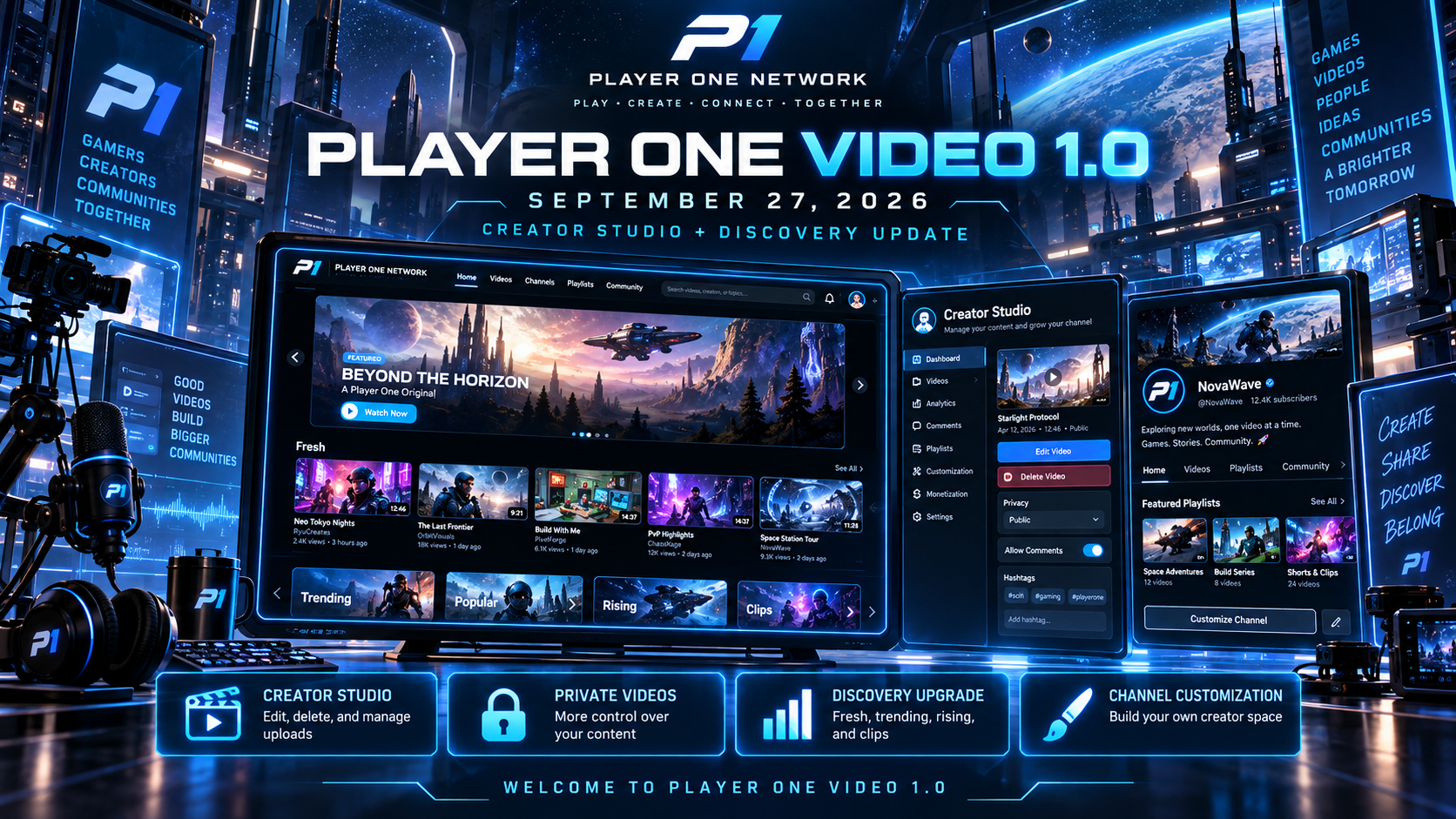
🎬 PLAYER ONE NETWORK — PATCH NOTES
Player One Video 1.0 • September 27, 2026
Another major milestone has arrived for Player One Network!
Today, we’ve been working on one of the largest expansions to our video platform since its original introduction.
After multiple development updates, creator improvements, interface redesigns, and community-focused changes, we’re officially introducing:
🚀 PLAYER ONE VIDEO 1.0
This update represents a major step toward making Player One Network a place where creators can build their own communities, share their content, manage their channels, and discover new audiences.
Version 1.0 isn’t just about uploading videos.
It’s about giving creators more control while giving viewers a better way to discover content from across the network.
🎥 WELCOME TO PLAYER ONE VIDEO 1.0
Player One Video is evolving into a more complete creator platform.
The latest update focuses on four major areas:
🎬 Creator control — More ways to manage your own content.
👤 Channel customization — Make your channel feel like your own community.
🌐 Content discovery — Help viewers find fresh, trending, and popular videos.
💙 Fairer exposure — Give newer creators opportunities to be discovered alongside established channels.
This is the foundation of what we want Player One Video to become.
🎛️ MAJOR CREATOR STUDIO EXPANSION
The Creator Studio has received a significant upgrade.
Creators now have considerably more control over their uploaded content without needing to reupload a video simply to correct a mistake.
The expanded Studio brings video management, channel settings, and community functionality into a more organized experience.
✏️ EDIT YOUR OWN VIDEOS
Creators can now edit their existing uploads.
Supported changes include:
- Video titles.
- Descriptions.
- Visibility settings.
- Comment preferences.
- Hashtags and discoverability information.
This makes it easier to correct mistakes, update outdated information, or prepare videos before publishing them publicly.
🗑️ DELETE YOUR OWN VIDEOS
Creators now have the ability to delete their own uploaded content.
Whether you’ve uploaded the wrong file, made a mistake, or simply no longer want a video on your channel, you have more control over your library.
Video management is now a more complete part of Creator Studio.
🔒 PUBLIC & PRIVATE VIDEOS
One of the biggest new additions is improved video privacy.
Creators can now choose whether their videos are:
🌐 Public
Available for the community to discover, watch, and interact with.
🔒 Private
Accessible only to the creator through the appropriate account controls.
Private videos are excluded from public discovery, and protected media handling has been introduced to support the new visibility system.
This is particularly useful for creators who want to prepare content ahead of time before making it public.
💬 CONTROL YOUR VIDEO COMMENTS
Creators now have more control over discussions underneath their uploads.
Comments can be enabled or disabled on individual videos.
This gives creators the freedom to decide which uploads should support community conversation.
For example, someone may want comments enabled on a gameplay video but disabled on an announcement or informational upload.
The setting can be managed through Creator Studio.
#️⃣ VIDEO HASHTAGS
Video discovery is receiving another major expansion through hashtags.
Creators can now assign up to 12 hashtags to their videos.
Hashtags help organize content and improve how viewers discover related uploads across Player One Network.
Examples include:
#Gaming • #Technology • #Gameplay • #Tutorial • #IndieGames • #P1Creator
Hashtags are also being connected to broader search and discovery functionality throughout the network.
The goal is to make relevant content easier to find without requiring viewers to already know which channel uploaded it.
👤 MORE CUSTOMIZABLE CREATOR CHANNELS
Creator Studio is no longer focused exclusively on managing individual uploads.
The latest expansion gives creators more control over their channel’s community experience.
New customization areas include:
- Channel announcements.
- Community discussion prompts.
- Channel guidelines.
- Additional community management options.
- Better organization of channel information.
These features build on the existing channel customization system, including playlists, categories, featured videos, and welcome messages.
A channel should feel like a creator’s own space within Player One Network.
🌐 VIDEO HOMEPAGE — MAJOR REDESIGN
The main video homepage has received one of its largest redesigns so far.
Previously, the experience needed better organization and more balance between different types of content.
The new direction is designed around discovery.
Rather than presenting one repetitive feed, Player One Video now gives viewers several ways to find something worth watching.
🌟 ROTATING VIDEO SPOTLIGHT
The video homepage now includes a rotating spotlight experience.
Instead of relying on a single static featured upload, the spotlight can present different videos based on recent activity and engagement.
This gives the homepage a more dynamic feel while creating additional opportunities for creators to receive visibility.
The spotlight is intended to balance activity, relevance, and freshness.
🔥 NEW VIDEO DISCOVERY SECTIONS
The homepage now includes more distinct ways to browse videos.
🆕 Fresh
Recently uploaded videos.
A place to discover new content without requiring creators to already have large audiences.
📈 Trending
Videos attracting recent activity and interaction.
⭐ Popular
Content receiving stronger overall attention from viewers.
🚀 Rising
Videos gaining momentum within a recent activity window.
🎬 Clips
Short-form content from across Player One Network.
These sections create a more organized experience while helping viewers explore different types of content.
⚖️ FAIRER VIDEO DISCOVERY
One of our biggest goals with Player One Video is avoiding a discovery system where the same established creators receive all the attention.
The latest update introduces a more balanced approach to video exposure.
Rather than relying entirely on total lifetime views, discovery considers multiple signals.
These include:
- How recently a video was uploaded.
- Recent viewing activity.
- Recent reactions and engagement.
- Momentum over time.
- Creator exposure across discovery sections.
- Content freshness.
A rolling 14-day activity window is also used for the Rising system.
This helps surface videos gaining attention more recently rather than relying only on historical popularity.
🎯 MORE OPPORTUNITIES FOR NEW CREATORS
New creators should have an opportunity to be discovered without needing an existing audience of thousands.
The updated discovery system introduces limits on repeated creator exposure within mixed recommendation areas.
It also reduces unnecessary duplication of the same video across discovery placements.
The goal is to introduce viewers to a broader mix of channels rather than repeatedly showing the same content.
Popular creators remain discoverable, while newer creators have more opportunities to appear alongside them.
💙 A MORE SOCIAL VIDEO EXPERIENCE
The video homepage now places greater emphasis on community interaction.
The redesign brings content, creators, and discovery together with:
- More prominent creator information.
- Improved channel visibility.
- Follow controls.
- Better video-card presentation.
- More organized content sections.
- Improved browsing between creators and uploads.
Player One Video should feel connected to the people creating the content, not just the videos themselves.
🎨 VIDEO INTERFACE REDESIGN
Alongside the new functionality, a major portion of today’s development focused on making the video experience cleaner and easier to use.
The redesigned interface features:
- A wider homepage layout.
- Improved content spacing.
- Better video-card proportions.
- Cleaner navigation.
- More consistent blue styling.
- Improved responsiveness.
- More balanced layouts across different video pages.
The overall goal is to make the platform feel more streamlined without sacrificing its interactive personality.
🧭 NEW VIDEO NAVIGATION LAYOUT
The video navigation previously suffered from cramped layouts and unnecessary internal scrolling.
This became especially noticeable when more navigation options were introduced.
The updated navigation now makes better use of available space.
Improvements include:
- Wider navigation layouts.
- Dedicated navigation rows.
- Better spacing between controls.
- Improved search and account positioning.
- Removal of the unnecessary internal navigation scrollbar.
- Responsive browsing controls for smaller screens.
The new layout is intended to keep navigation easier to access without requiring horizontal scrolling through a crowded menu.
🖥️ CHANNEL NAVIGATION FIXES
A separate issue caused navigation to become compressed on certain video and creator-channel pages.
The latest update includes additional responsive-layout corrections.
Navigation now adapts more appropriately to available space across:
- Video Home.
- Creator Studio.
- Individual video pages.
- Creator channels.
- Narrower browser windows.
This also improves consistency between different parts of Player One Video.
🖱️ VIDEO CARD HOVER IMPROVEMENTS
Video cards have received additional visual refinement.
Previously, hovering over videos could cause certain elements to look misaligned or extend awkwardly beyond their containers.
The updated hover presentation focuses on:
- Cleaner card framing.
- More controlled animations.
- Better element positioning.
- Improved spacing.
- Less awkward overflow.
- More consistent interaction feedback.
The goal is to make browsing feel interactive while keeping the interface organized.
📝 VIDEO DESCRIPTION EDITOR FIX
A bug was discovered where editing a video description could expose formatting markup rather than presenting the actual description as readable text.
That behavior has been corrected.
Creators should now see a more natural editing experience instead of raw formatting code appearing inside the description field.
This makes updating descriptions considerably easier.
🖱️ CUSTOM CREATOR STUDIO SCROLLBAR
The video editing interface also received a custom scrollbar.
The previous scrollbar looked disconnected from the rest of Player One Network.
The updated version better matches the P1 design with:
- More consistent colors.
- Cleaner appearance.
- Better visual integration.
- Improved editing-panel presentation.
Small details like this help make Creator Studio feel like a unified experience.
🧩 EXISTING CREATOR FEATURES PRESERVED
The 1.0 expansion builds on the Creator Hub rather than replacing everything creators already use.
Existing systems remain part of the experience, including:
🎬 Video uploads
📱 Clips
📂 Playlists
🗃️ Channel categories
🌟 Featured videos
👋 Welcome messages
❤️ Reactions
💬 Community interactions
🎭 Theater Mode
👤 Creator profiles
The new features expand the existing platform while preserving the content and tools already established.
🛠️ LATEST VIDEO 1.0 HOTFIXES
Following the initial 1.0 expansion, several additional refinement updates were made.
Version 1.0.0 — Creator Control
Introduced expanded video management, edit/delete functionality, video privacy, comment controls, hashtags, and additional channel customization.
Version 1.0.1 — Discovery & Studio
Improved description editing, added the custom scrollbar, and redesigned the video homepage with rotating spotlight and broader content discovery.
Version 1.0.2 — Homepage & Navigation
Expanded the homepage width, reorganized navigation, removed unnecessary internal scrolling, and improved video-card hover behavior.
Version 1.0.3 — Navigation Refinement
Corrected cramped navigation across different video and channel pages and improved responsive layout behavior.
These updates are part of the continuing refinement of the 1.0 experience.
📋 PLAYER ONE VIDEO 1.0 — UPDATE HIGHLIGHTS
Today’s major additions and improvements include:
🎬 Player One Video 1.0 introduced
🎛️ Expanded Creator Studio
✏️ Edit your own videos
🗑️ Delete your own uploads
🔒 Public and private video options
💬 Individual video comment controls
#️⃣ Video hashtags and improved discovery
👤 Expanded creator-channel customization
📢 Channel announcements and community tools
🌐 Major video homepage redesign
🌟 Rotating video spotlight
🆕 Fresh discovery section
📈 Trending and Rising content
⭐ Popular videos
🎬 Clips discovery
⚖️ More balanced creator exposure
💙 Improved creator visibility
🖥️ Wider homepage layout
🧭 Redesigned navigation
🖱️ Improved hover interactions
📝 Readable video-description editing
🎨 Custom Studio scrollbar
📐 Responsive navigation fixes
🔮 WHAT COMES NEXT FOR PLAYER ONE VIDEO?
Version 1.0 establishes a stronger foundation for the future of video on Player One Network.
Further development will continue focusing on:
- Creator discovery.
- More community-oriented channel features.
- Video recommendations.
- Better creator analytics.
- Improved search.
- Clips and short-form content.
- Viewer interaction.
- Creator customization.
- Performance and responsiveness.
- Future livestreaming capabilities.
The goal is to continue giving creators more control while making the video experience more enjoyable for viewers.
💙 A PLATFORM FOR EVERY CREATOR
Player One Video isn’t being built exclusively for creators who already have an audience.
We want it to be a place where someone uploading their first video can participate alongside someone who has been creating content for years.
A place where viewers can discover something new.
Where creators can build communities.
Where content can connect people across gaming and technology.
And where the network continues growing alongside the people who use it.
🎬 WELCOME TO PLAYER ONE VIDEO 1.0
This is an important milestone for Player One Network, and there’s still plenty more ahead.
Thank you to everyone testing the platform, sharing content, and helping shape its future.
Your content. Your channel. Your community.
Play. Create. Connect. Together. 🎮💙
— Player One Network
COMMUNITY DISCUSSION
Join the conversation